

Salesforce Lightning Web Components from Scratch: A Concise, Rigorous Learning Guide
Executive summary
Lightning Web Components, or LWC, is Salesforce’s standards-oriented UI programming model for building reusable components with JavaScript, HTML, CSS, Web Components concepts, Salesforce metadata, and Salesforce data services. Salesforce recommends the Salesforce DX workflow—Salesforce CLI, a DX project, VS Code with the Salesforce Extension Pack, and a scratch org or sandbox—for the most integrated development experience. [1]
The fastest route to productive LWC development is not to memorize every decorator or base component. It is to learn the architecture in this order:
JavaScript and Web Components fundamentals → LWC component model → reactivity and data flow → composition and events → LDS/wire → Apex → forms/navigation → testing → security/performance/deployment.
The most important architectural rule is:
Prefer declarative, platform-managed mechanisms before writing custom code.
For Salesforce data, this translates into the following decision sequence:
Lightning base record components → Lightning Data Service/UI API wire adapters → imperative UI API functions → Apex only when Salesforce data services cannot satisfy the requirement. Salesforce explicitly recommends LDS where possible because it handles caching and security and keeps record data synchronized; Apex-returned data is not automatically managed by LDS. [2]
For component communication, the central mental model is:
Properties down, events up.
A parent passes values to a child through public @api properties; a child communicates changes upward with DOM/custom events. Public methods decorated with @api are appropriate when a parent must explicitly command a child to perform an operation. Salesforce recommends the least permissive event propagation that meets the requirement. [3]
For reactivity, modern LWC fields are reactive without @track; @track is primarily relevant when you intentionally need observation of mutations inside plain objects or arrays. In most application code, immutable-style reassignment such as { ...obj } or [...items] is easier to reason about and usually preferable. [4]
For data retrieval, the distinction between @wire and imperative calls is fundamental:
Question | Prefer |
Should data automatically refresh when a reactive parameter changes? | @wire |
Is this a read operation naturally managed by LDS/UI API? | LDS wire adapter |
Must the operation happen only after a user action? | Imperative call |
Does the Apex method perform DML? | Imperative Apex |
Do you require custom SOQL, aggregation, transactions, unsupported APIs, or server-side business logic? | Apex |
Can a base record form solve the problem? | Use the base component instead |
The wire service provisions a reactive stream and is particularly suitable for reads. Imperative Apex gives the developer explicit control and is required for non-cacheable Apex operations such as DML. [5]
For security, assume client-side code is never a security boundary. Prefer LDS/UI API because Salesforce handles sharing, CRUD, and FLS. When Apex is required, make security explicit: use an appropriate sharing declaration and enforce object/field permissions with user-mode operations or Security.stripInaccessible() as required by the use case. In current API version 67.0, Apex security defaults have evolved, which makes explicit access-mode declarations particularly valuable for code that must remain understandable across API versions. [6]
Lightning Web Security is now the modern client-side isolation architecture; new orgs have LWS enabled by default, while Lightning Locker remains relevant for older configurations and some specialized containers. LWS uses JavaScript sandboxes and standards-oriented mechanisms rather than Locker's secure wrappers. [7]
A developer who is already comfortable with JavaScript and Salesforce can reasonably reach working LWC proficiency in roughly 25–35 focused hours and production-oriented competence after approximately 40–55 hours plus project experience. These are planning estimates for this guide rather than Salesforce estimates. Salesforce's current Build Lightning Web Components Trail itself contains roughly 11 hours of guided material, so hands-on repetition beyond Trailhead is essential. [8]
Foundations and development setup
Prerequisites
You should already understand modern JavaScript basics—classes, modules, destructuring, arrays, promises, async/await, events, object spread, and standard HTML/CSS. Salesforce's own learning materials expect familiarity with JavaScript/web standards and Salesforce DX fundamentals. [9]
For development, install:
Tool | Purpose |
Salesforce CLI (sf) | Authenticate orgs, create projects/orgs/components, deploy/retrieve metadata |
VS Code | Recommended editor |
Salesforce Extension Pack | Salesforce metadata, Apex and LWC tooling |
Node.js/npm | Jest, linting, supporting JavaScript tooling |
Git | Version-controlled source |
Salesforce org | Runtime environment |
Salesforce recommends VS Code with its Salesforce extensions, although another editor can be used. Lightning web components cannot be developed directly in the Salesforce Developer Console. [10]
Minimal setup
sf project generate --name lwc-learning
cd lwc-learning
sf org login web --alias devOrg
sf lightning generate component
--name hello
--type lwc
--output-dir force-app/main/default/lwc
The current Trailhead workflow likewise uses the sf lightning generate component command and places components under force-app/main/default/lwc. [11]
When to use: Use a standard Salesforce DX project for essentially all professional LWC development.
Common mistakes: Developing files outside the DX package directory, treating an org as the source of truth instead of Git, skipping linting, or starting directly in production.
Org types
A scratch org is disposable and optimized for source-driven development; scratch orgs have source tracking enabled by default and require a Dev Hub. Developer/Developer Pro sandboxes can also participate in source tracking. Non-source-tracked environments remain perfectly usable, but their metadata synchronization workflow is more explicit. [12]
Org type | Best role in LWC work | Main characteristic |
Scratch org | Feature development, CI, isolated experimentation | Disposable, source-oriented |
Developer/Developer Pro sandbox | Developer/integration environment | Persistent copy with Salesforce configuration |
Full/Partial sandbox | Integration/UAT/performance-oriented validation | More representative production data/config |
Developer Edition / Trailhead Playground | Learning and experimentation | Simple personal environment |
Production | Release destination | Do not treat as primary development workspace |
For learning, a Developer Edition, Trailhead Playground, or scratch org is sufficient. For professional development, scratch orgs or development sandboxes plus source control are generally the better architecture. Salesforce's own DX guidance recommends scratch orgs for development and non-production environments before release. [13]
Component anatomy
A normal bundle looks like:
hello/
├── hello.html
├── hello.js
├── hello.css
└── hello.js-meta.xml
The folder is the component bundle. HTML provides the template, JavaScript provides state/behavior, CSS is component-scoped styling, and js-meta.xml controls Salesforce metadata such as exposure and supported targets. [14]
Minimal HTML:
<template>
<p>Hello {name}</p>
</template>
Minimal JavaScript:
import { LightningElement } from 'lwc';
export default class Hello extends LightningElement {
name = 'Kamal';
}
Minimal CSS:
p {
font-weight: 600;
}
Minimal metadata for a Lightning page:
<?xml version="1.0" encoding="UTF-8"?>
<LightningComponentBundle xmlns="http://soap.sforce.com/2006/04/metadata">
<apiVersion>67.0</apiVersion>
<isExposed>true</isExposed>
<targets>
<target>lightning__AppPage</target>
<target>lightning__RecordPage</target>
<target>lightning__HomePage</target>
</targets>
</LightningComponentBundle>
Summer ’26 corresponds to Salesforce API version 67.0. js-meta.xml is mandatory for the bundle and defines values such as exposure, targets, capabilities, and builder configuration. [15]
When to use: Every platform LWC uses this bundle model. Omit the CSS file only when the component has no component-specific styling.
Common mistakes: Forgetting isExposed, configuring the wrong target, using mismatched filenames/folder names, or expecting parent CSS to freely penetrate a child component's shadow boundary. Component CSS is scoped under shadow DOM. [16]
Core component model
Reactive properties and data binding
LWC templates bind JavaScript values with {property}. Fields used by the template—or by getters used by the template—participate in reactivity. Primitive field changes are detected through assignment; object/array mutation requires additional care. [17]
<lightning-input
value={name}
onchange={handleChange}>
</lightning-input>
<p>Hello {name}</p>
name = 'Ada';
handleChange(event) {
this.name = event.target.value;
}
This resembles two-way binding from the user's perspective, but the architecture is one-directional: JavaScript state renders into the template, while DOM events explicitly update JavaScript state. Parent-to-child component data flow is also one-way. [18]
When to use: For virtually all component state.
Common mistakes: Expecting {name} itself to mutate JavaScript state, modifying object properties without understanding reactivity, or putting excessive business logic into templates.
For derived state, prefer a getter:
firstName = 'Ada';
lastName = 'Lovelace';
get fullName() {
return `${this.firstName} ${this.lastName}`;
}
<p>{fullName}</p>
Salesforce specifically supports getters as the standard way to compute values for simple template bindings. [19]
@api
@api marks a property or method as part of a component's public API. [20]
Child:
import { LightningElement, api } from 'lwc';
export default class Greeting extends LightningElement {
@api name;
}
Parent:
<c-greeting name="Ada"></c-greeting>
Reactive parent value:
<c-greeting name={selectedName}></c-greeting>
When to use: Inputs controlled by the parent or public methods intentionally exposed to consumers.
Common mistakes: Making every property @api, mutating an object or array owned by the parent, or changing your own public input unexpectedly. Non-primitive data passed from an owner is treated as read-only; copy it before changing it. [21]
Public method:
@api
reset() {
this.value = '';
}
Parent:
this.template.querySelector('c-child').reset();
Use public methods for imperative parent-to-child commands, not as a substitute for ordinary property flow. [22]
@track
All LWC class fields have been reactive since Spring ’20. @track remains useful for observing internal mutations to plain objects and arrays. [23]
import { track } from 'lwc';
@track person = { name: 'Ada' };
rename() {
this.person.name = 'Grace';
}
In most code, immutable reassignment is clearer:
rename() {
this.person = {
...this.person,
name: 'Grace'
};
}
When to use: Deep observation of mutation within plain {} objects and [] arrays when reassignment is inconvenient.
Common mistakes: Assuming @track is mandatory for every field, expecting it to deeply observe Date, Map, Set, or arbitrary class instances, or adding it everywhere out of habit. Salesforce documents those types as non-trackable for internal mutation. [24]
@wire
@wire connects a component to a reactive wire adapter or cacheable Apex method. Reactive parameters use $. [25]
import { LightningElement, api, wire } from 'lwc';
import { getRecord } from 'lightning/uiRecordApi';
import NAME from '@salesforce/schema/Account.Name';
export default class AccountName extends LightningElement {
@api recordId;
@wire(getRecord, {
recordId: '$recordId',
fields: [NAME]
})
account;
}
When recordId changes, the wire configuration changes and fresh data can be provisioned. A provision may be served from LDS cache rather than requiring a network call. [26]
When to use: Reactive reads whose lifecycle should be managed by the framework.
Common mistakes: Forgetting $ for reactive parameters, passing undefined adapter configuration values, mutating wired data directly, or expecting @wire to execute like a conventional synchronous function. Wire data is provisioned as an immutable stream. [27]
Lifecycle hooks
LWC supports constructor(), connectedCallback(), renderedCallback(), disconnectedCallback(), and errorCallback(). [28]
Minimal lifecycle pattern:
connectedCallback() {
this.initialize();
}
disconnectedCallback() {
this.cleanup();
}
Post-render integration:
hasRendered = false;
renderedCallback() {
if (this.hasRendered) return;
this.hasRendered = true;
// one-time DOM/library initialization
}
renderedCallback() can execute repeatedly. Changing reactive state from it can produce render loops; Salesforce specifically warns against updating fields/public properties or wire configuration there. [29]
Hook | Appropriate work | Avoid |
constructor | Minimal object initialization | DOM access |
connectedCallback | Setup independent of rendered child DOM | Assuming template elements already exist |
renderedCallback | DOM-dependent/third-party initialization | Unconditional state changes |
disconnectedCallback | Remove external listeners/timers/subscriptions | Leaving global resources alive |
errorCallback | Error boundary behavior for descendant errors | Treating it as universal async error handling |
When to use: Only when the operation truly corresponds to that lifecycle phase.
Common mistake: Treating renderedCallback() like a generic initialization hook.
Templates and conditional rendering
Modern conditional rendering uses:
<template lwc:if={isLoading}>
<lightning-spinner></lightning-spinner>
</template>
<template lwc:elseif={hasError}>
<p>Error</p>
</template>
<template lwc:else>
<p>Ready</p>
</template>
Salesforce recommends lwc:if, lwc:elseif, and lwc:else; legacy if:true/if:false directives are no longer recommended. [30]
Lists:
<template for:each={accounts} for:item="account">
<p key={account.Id}>{account.Name}</p>
</template>
Every repeated item requires a stable key, and the array index must not be used as key; keys let LWC efficiently reuse/rerender list elements. [31]
When to use: lwc:if for actual DOM insertion/removal; for:each for ordinary list rendering.
Common mistakes: Using deprecated conditionals, unstable list keys, index-as-key, or excessively complicated expressions where a named getter would be more maintainable.
Event handling
Native events use normal DOM-style handlers:
<lightning-button
label="Save"
onclick={handleSave}>
</lightning-button>
handleSave(event) {
// respond to click
}
Declarative template listeners are usually preferable to manually adding listeners because they require less lifecycle management and less code. [32]
When to use: User interaction and base-component events.
Common mistakes: Calling the handler in markup (onclick={handleSave()}), relying blindly on event.target when event retargeting is involved, or dynamically registering listeners without removing externally owned listeners.
Custom events
Child:
handleSelect() {
this.dispatchEvent(
new CustomEvent('select', {
detail: { id: this.recordId }
})
);
}
Parent:
<c-account-row onselect={handleSelect}></c-account-row>
handleSelect(event) {
this.selectedId = event.detail.id;
}
Custom events are the normal way to communicate upward. CustomEvent defaults to bubbles: false and composed: false; Salesforce recommends using the least permissive propagation configuration that solves the requirement. [33]
When to use: Child → parent notification.
Common mistakes: Automatically specifying:
{ bubbles: true, composed: true }
for every event. A bubbling/composed event crosses larger portions of the component tree, expanding the component's public API contract and increasing collision risk. [34]
Parent-child communication summary
Direction | Mechanism | Example |
Parent → child data | @api property | <c-child value={x}> |
Parent → child action | @api method | child.reset() |
Child → parent | Custom event | dispatchEvent(...) |
Ancestor communication across unrelated branches | Lightning Message Service when justified | Message channel |
The first three patterns should cover the overwhelming majority of local component composition. Salesforce's data-flow guidance explicitly follows owner-controlled data flowing downward and events flowing upward. [35]
Salesforce data, forms, Apex, and navigation
The biggest architectural decision in an LWC is often not the HTML—it is how the component accesses data.
Lightning Data Service versus Apex
LDS is the platform-managed Salesforce data layer underlying record forms, lightning/ui*Api wire adapters/functions, and related APIs. It provides client caching, progressive loading, cache invalidation, request deduplication and data synchronization between components using compatible data services. Apex data is not managed in the same fashion. [36]
Dimension | LDS / UI API | Apex |
Standard record CRUD | Excellent fit | Usually unnecessary |
CRUD/FLS enforcement | Platform managed | Must be designed correctly |
Client record cache | Built in | Cacheable Apex only, different lifecycle |
Automatic record synchronization | Strong | Developer managed |
Custom SOQL | No | Yes |
Aggregations | Limited | Yes |
Complex transactions | Limited | Yes |
Multiple-record atomic business operation | Not the main use case | Yes |
Unsupported object/API logic | May not work | Often appropriate |
Custom server business logic | Limited | Yes |
Boilerplate | Lower | Higher |
Salesforce recommends LDS for standard record access and Apex when base components/UI API cannot satisfy the requirement. Multiple records updated through LDS functions are separate operations; Apex is appropriate when multiple changes must participate in one server transaction. [37]
When to use LDS: Normal Salesforce record display/edit/create, schema-aware UI, reactive record information.
When to use Apex: Custom SOQL, aggregate queries, multi-object server logic, transactions, unsupported operations or business logic that belongs on the server.
Common mistake: Writing Apex because "that's how Salesforce data access has always worked." In LWC, unnecessary Apex costs caching, security convenience and synchronization capabilities.
Wire adapters
A custom UI reading Account Name:
import { wire } from 'lwc';
import { getRecord, getFieldValue }
from 'lightning/uiRecordApi';
import NAME
from '@salesforce/schema/Account.Name';
@wire(getRecord, {
recordId: '$recordId',
fields: [NAME]
})
account;
get accountName() {
return getFieldValue(this.account.data, NAME);
}
getRecord is an LDS/UI API wire adapter and can retrieve explicitly requested fields. Salesforce recommends requesting fields rather than whole layouts when possible because it reduces unnecessary data transfer. [38]
When to use: Custom record UIs where lightning-record-form is too opinionated but Apex is unnecessary.
Common mistakes: Loading an entire layout for three fields, using string field names when schema imports could provide compile-time validation, or failing to handle the error side of wire results.
Wire Apex
Apex:
public with sharing class AccountController {
@AuraEnabled(cacheable=true)
public static List<Account> search(String term) {
return [
SELECT Id, Name
FROM Account
WHERE Name LIKE :('%' + term + '%')
WITH USER_MODE
LIMIT 20
];
}
}
LWC:
import search from
'@salesforce/apex/AccountController.search';
@wire(search, { term: '$searchTerm' })
accounts;
An Apex method wired into LWC must be static, exposed using @AuraEnabled, and marked cacheable=true. Reactive Apex parameters use the same $property convention. [39]
When to use: Custom server-side read logic that should react automatically to parameter changes.
Common mistakes: Missing cacheable=true, assuming LDS manages Apex data, overloaded @AuraEnabled methods, or using wire for mutations. Salesforce warns against overloaded @AuraEnabled methods because method selection is not deterministic. [40]
@wire versus imperative
Characteristic | @wire | Imperative |
Control | Framework | Developer |
Result model | Reactive provisioning / stream | One invocation, one response |
Reactive parameters | Yes | Manual |
Cacheable Apex | Required | Optional for read-only calls |
Non-cacheable Apex | No | Yes |
DML Apex | No | Yes |
Trigger from button | Possible indirectly, but awkward | Natural |
Error flow | data/error | Promise / async-await |
Best use | Reactive reads | Explicit commands |
The wire service delegates control to LWC; imperative calls are explicit and therefore suitable for operations whose timing must be controlled. [41]
Imperative Apex
import saveAccount from
'@salesforce/apex/AccountController.saveAccount';
async handleSave() {
try {
await saveAccount({ name: this.name });
} catch (error) {
this.error = error;
}
}
When to use: DML, button-driven queries, non-cacheable Apex or any operation where execution timing matters.
Common mistakes: Forgetting try/catch, mixing Promise styles unnecessarily, treating the returned data as LDS-managed, or blindly retrying mutations.
After imperative Apex changes records that LDS-backed components use, notify LDS when appropriate:
import { notifyRecordUpdateAvailable }
from 'lightning/uiRecordApi';
await updateViaApex();
await notifyRecordUpdateAvailable([
{ recordId: this.recordId }
]);
notifyRecordUpdateAvailable() informs LDS that records changed outside LDS mechanisms. For Apex data provisioned through an Apex wire, use refreshApex() to refresh that wire result. [42]
Forms and validation
Start with the highest-level component that meets the requirement.
Simple record form:
<lightning-record-form
record-id={recordId}
object-api-name="Account"
fields={fields}
mode="edit">
</lightning-record-form>
For custom layout:
<lightning-record-edit-form
object-api-name="Account"
record-id={recordId}>
<lightning-input-field
field-name="Name">
</lightning-input-field>
<lightning-button
type="submit"
label="Save">
</lightning-button>
</lightning-record-edit-form>
lightning-record-form is the simplest general-purpose base form. lightning-record-edit-form provides more control. Record-form components handle much of record metadata, validation, CRUD behavior and error handling automatically. [43]
For client-side validation:
<lightning-input
data-id="email"
type="email"
required>
</lightning-input>
const input =
this.template.querySelector('[data-id="email"]');
if (!input.checkValidity()) {
input.reportValidity();
}
Custom validation:
input.setCustomValidity(
isAllowed ? '' : 'Value is not allowed'
);
input.reportValidity();
lightning-input-field is preferred inside lightning-record-edit-form for normal schema-based fields, but it does not provide arbitrary client-side custom validation in the same way as lightning-input. Salesforce recommends Salesforce validation rules when that validation belongs to the record/business domain. [44]
When to use: Base record forms first; custom lightning-input when UI-specific validation or behavior exceeds what record fields provide.
Common mistakes: Reimplementing Salesforce validation rules only in JavaScript, using client-side validation as security, or creating a fully custom UI when a record-form component already handles the requirement.
Navigation
Use Salesforce's navigation service rather than constructing Lightning URLs manually.
import { NavigationMixin }
from 'lightning/navigation';
export default class OpenAccount
extends NavigationMixin(LightningElement) {
openRecord() {
this[NavigationMixin.Navigate]({
type: 'standard__recordPage',
attributes: {
recordId: this.recordId,
objectApiName: 'Account',
actionName: 'view'
}
});
}
}
Navigation is based on PageReference objects so applications are not coupled to Salesforce's URL structure. The same API supports generation of corresponding URLs. [45]
When to use: Records, object pages, lists, tabs, components and supported Salesforce destinations.
Common mistakes: Hard-coded /lightning/r/... URL strings or assuming every navigation PageReference works identically across Lightning Experience, Experience Cloud, mobile, and external containers. Salesforce documents container-specific support. [46]
Testing, deployment, and day-to-day engineering
Jest unit testing
Salesforce uses Jest for isolated LWC unit tests. Jest tests run outside a Salesforce org and do not connect to an org, making them fast and appropriate for component behavior, rendering, public APIs, events and user interaction. [47]
Minimal component:
export default class Counter extends LightningElement {
count = 0;
increment() {
this.count += 1;
}
}
Minimal Jest concept:
import { createElement } from 'lwc';
import Counter from 'c/counter';
it('increments the count', async () => {
const element = createElement('c-counter', {
is: Counter
});
document.body.appendChild(element);
element.shadowRoot
.querySelector('button')
.click();
await Promise.resolve();
expect(
element.shadowRoot.querySelector('span').textContent
).toBe('1');
});
When to use: Every reusable or behavior-bearing component, particularly event contracts, conditional rendering, input/output logic and error states.
Common mistakes: Testing implementation details rather than observable behavior, attempting to call a real org from Jest, forgetting the asynchronous render cycle, or building one enormous snapshot as the primary test strategy.
For wires, use Jest's wire mocking utilities:
getRecord.emit(mockRecord);
Salesforce's Jest utilities provide generic, LDS and Apex wire test adapters so tests can control responses without remote calls. [48]
Run tests using the project test script or current CLI tooling:
npm run test:unit
Salesforce also documents:
sf force lightning lwc test run
for running project LWC tests. [49]
The best practical examples are in Salesforce's LWC Recipes repository, where the examples intentionally demonstrate focused tasks with minimal code. [50]
Deployment with Salesforce DX
Deploy a single component:
sf project deploy start
--source-dir force-app/main/default/lwc/accountCard
--target-org devOrg
Deploy the package directory:
sf project deploy start
--source-dir force-app
--target-org devOrg
Current Salesforce DX documentation uses project deploy start for deployment across source-tracked and non-source-tracked org workflows. [51]
Retrieve metadata where appropriate:
sf project retrieve start
--metadata LightningComponentBundle:accountCard
--target-org devOrg
When to use: Local development, CI/CD pipelines and controlled promotions.
Common mistakes: Deploying directly from one org to another without Git, assuming retrieval automatically protects local work, or failing to test the component with the same permission model as production users.
For non-source-tracked orgs, retrieval can overwrite local source; Salesforce specifically warns developers to manage such changes through source control. [52]
Debugging
Enable Debug Mode for your development user, then inspect source and runtime behavior through Chrome DevTools. In Debug Mode, the LWC engine provides readable/unminified code and can report runtime warnings for problematic patterns. [53]
Recommended debugging sequence:
Browser console
↓
Network activity
↓
Wire/Apex data shape
↓
Reactive state
↓
DOM/template condition
↓
Lifecycle timing
↓
Permissions/security
For a wired function, temporarily make the state explicit:
@wire(getRecord, config)
wiredRecord({ data, error }) {
console.log('data', data);
console.error('error', error);
}
Salesforce has dedicated DevTools support for inspecting wire configuration and values. [54]
Useful development setting:
Setup → Session Settings → disable secure and persistent browser caching temporarily.
This can make source changes visible more quickly in development environments, but Salesforce explicitly recommends re-enabling secure browser caching because disabling it harms Lightning performance and should not be a production configuration. [55]
Current Salesforce development tooling also includes LWC Live Preview, which can reflect many local .js, .html, and .css edits while developing, although certain metadata and wire-related changes still require deployment/restart. [56]
Common debugging mistakes: Debugging minified production code without enabling Debug Mode, blaming reactivity before checking the actual server response, forgetting browser cache, or debugging as an administrator when the failure affects lower-permission users.
Security, performance, and production pitfalls
CRUD, FLS, sharing and Apex
Prefer LDS whenever the use case fits because LDS handles sharing, CRUD and field-level security for supported operations. [57]
When Apex is required, make intent explicit:
public with sharing class AccountService {
@AuraEnabled(cacheable=true)
public static List<Account> getAccounts() {
return [
SELECT Id, Name
FROM Account
WITH USER_MODE
LIMIT 20
];
}
}
Salesforce's current security guidance documents WITH USER_MODE as the straightforward mechanism for enforcing object and field permissions during SOQL and recommends Security.stripInaccessible() when graceful stripping/sanitization is preferable to an access exception. Record sharing and object/field permissions are separate security concerns. [58]
Example sanitization pattern:
SObjectAccessDecision decision =
Security.stripInaccessible(
AccessType.READABLE,
records
);
return decision.getRecords();
When to use WITH USER_MODE: Fail the operation if the user cannot access requested data.
When to use stripInaccessible(): Gracefully remove inaccessible fields or sanitize records.
Common mistakes: Thinking with sharing enforces FLS, trusting fields hidden in JavaScript, exposing unrestricted @AuraEnabled server methods, or performing security checks only in the UI. [58]
Lightning Web Security and Locker
Lightning Web Security isolates components in JavaScript sandboxes and is the modern replacement architecture for Lightning Locker. New orgs have LWS enabled by default; if LWS is disabled, Locker remains relevant. LWS generally supports more web-platform functionality, cross-namespace scenarios and third-party library patterns than Locker. [59]
Area | Lightning Locker | Lightning Web Security |
Architecture | Secure wrappers | JavaScript sandbox/distortions |
Status | Legacy/predecessor | Current architecture |
New org default | No | Yes |
Third-party/custom elements | More restrictive | Broader compatibility |
Cross-namespace capabilities | Restricted | More capable |
Performance model | Wrapper overhead | Generally lighter sandbox architecture |
Salesforce still recommends testing LWS changes in a sandbox before enabling them in a mature production org with existing components. [60]
When to care: Third-party libraries, cross-namespace components, direct DOM operations or migration of older Locker-era applications.
Common mistakes: Depending on undocumented base-component DOM, global DOM traversal, mutating objects shared across namespaces, or assuming LWS means arbitrary browser code is automatically safe. Salesforce's LWS guidance specifically cautions against unsafe object mutation patterns. [61]
Performance
The highest-impact performance rule is usually reduce unnecessary server work and unnecessary DOM work.
For data:
@wire(getRecord, {
recordId: '$recordId',
fields: [NAME, INDUSTRY]
})
account;
is generally preferable to requesting an entire layout when only two fields are required. Salesforce explicitly recommends specifying fields rather than layouts when possible. [62]
For Apex reads:
@AuraEnabled(cacheable=true)
public static List<Account> getAccounts() { ... }
enables client-side caching and is mandatory for wired Apex. Cacheable reads can display cached results without waiting for a server trip. [63]
For lists:
<div key={record.Id}>
Use stable business identifiers, not indexes. LWC uses list keys to identify items and avoid unnecessary element recreation. [64]
For architecture:
Bad:
component A → Apex
component B → same Apex
component C → same Apex
Better when possible:
shared LDS/wire cache
↓
A B C
LDS can deduplicate requests, cache data and synchronize dependent components, which is a major reason to prefer it over manually duplicated Apex calls for ordinary record access. [36]
Key performance practices supported by Salesforce's LWC performance guidance include minimizing server trips, using caching, avoiding unnecessary component instantiation, using efficient list rendering, controlling event propagation, limiting third-party JavaScript/CSS weight and avoiding expensive rendering/reflow patterns. [65]
Common mistake: Premature micro-optimization while retrieving 200 fields, issuing duplicate Apex calls or rendering hundreds of unnecessary DOM nodes.
Common pitfalls matrix
Pitfall | Why it fails | Preferred approach |
@track on every field | Obsolete mental model | Ordinary fields + immutable reassignment |
Mutating @api object | Child doesn't own parent data | Clone, then modify |
if:true everywhere | Legacy directive | lwc:if |
Array index as key | Unstable identity | Record Id/stable key |
DML via wired Apex | Wire intended for cacheable reads | Imperative Apex |
Apex for simple record read | Loses LDS advantages | getRecord / record form |
Entire layout for two fields | More data/metadata | Explicit fields |
bubbles:true, composed:true by default | Overexposed event API | Least permissive propagation |
State changes in renderedCallback() | Render loop risk | Compute/set state earlier |
Hard-coded Lightning URL | Container/URL coupling | NavigationMixin |
Assuming with sharing = CRUD/FLS | Different security layers | User-mode/FLS enforcement |
Custom JS validation only | Client can be bypassed | Salesforce validation/security |
refreshApex() on everything | Wrong refresh mechanism | Use mechanism appropriate to data source |
No wire error branch | Silent failure | Handle both data and error |
Queries/APIs from every tiny child | Duplicate data access | Share state or use LDS cache |
DOM selectors against base internals | Encapsulation instability | Public component APIs |
Administrator-only testing | Permission defects hidden | Test realistic personas |
The pitfalls above follow directly from Salesforce's current guidance on decorators/reactivity, templates, list keys, events, wire/Apex, LDS, lifecycle hooks, navigation and security. [66]
One additional 2026-era point is worth emphasizing: avoid learning LWC from old examples without checking the current documentation. Some historically common patterns have changed—for example, if:true/if:false are no longer recommended, @track is no longer required for ordinary fields, getListUi is deprecated in current guidance, and Lightning Web Security has replaced Locker as the default architecture for new orgs. [67]
Learning path and milestones
The following schedule assumes an experienced developer who understands Salesforce fundamentals but is new to LWC. The estimates are deliberately practical rather than being copied from Trailhead.
Milestone | Focus | Estimated focused time | Exit criterion |
Web + DX refresh | ES modules, classes, promises, DX project, CLI, org authentication | 3–4 h | Create/deploy an LWC from CLI |
Component fundamentals | Bundle anatomy, template binding, CSS, metadata, base components | 4–5 h | Build several small presentational components |
Reactivity and composition | Reactivity, getters, @api, @track, events, lifecycle, lists | 5–6 h | Parent/child components communicate correctly |
Salesforce data | LDS, record forms, wire adapters, @wire, schema imports | 5–7 h | CRUD UI without Apex |
Apex and complex interactions | Wire Apex, imperative Apex, refresh patterns, error handling, navigation | 5–7 h | Correctly choose LDS vs Apex |
Quality engineering | Jest, debugging, validation, deployment | 4–6 h | Unit-tested component deployed through CLI |
Production readiness | Security, LWS, performance, permission testing, architecture review | 4–6 h | Component passes production-style review |
Working proficiency: approximately 30–41 hours from this schedule.
Production fluency: add real project work, code review and troubleshooting experience rather than simply adding more tutorials.
Salesforce's official Build Lightning Web Components Trail currently lists approximately 11 hours of guided Trailhead material covering setup, basics, Salesforce data, Jest testing and troubleshooting. It is an excellent structured foundation, but mastery requires deliberate hands-on work beyond the guided exercises. [8]
|
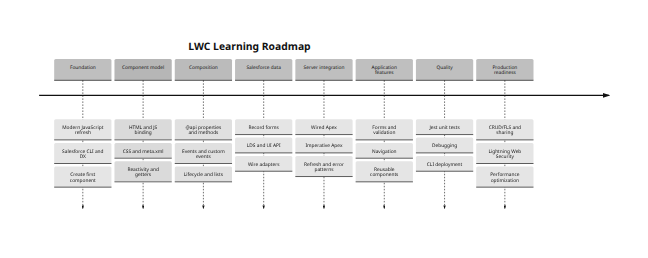
The best hands-on learning strategy is many tiny components, not one large training application. For example: one component purely for conditional rendering, another for @api, another for custom events, another for getRecord, one wired Apex search, one imperative save, and one Jest exercise. This mirrors the philosophy of Salesforce's LWC Recipes project, which deliberately provides small, focused examples rather than large monolithic demonstrations. [68]
Primary-source learning library
For a concise learning program, the following official sources provide the highest value.
Priority | Resource | Best use |
Essential | Primary reference | |
Essential | Minimal working examples | |
Essential | Structured learning | |
Essential | Foundation | |
Essential | Choosing LDS/UI API/Apex | |
Important | Correct @wire mental model | |
Important | State behavior | |
Important | @api, @track, @wire | |
Important | Lifecycle model | |
Important | Component communication | |
Important | Server integration | |
Important | Unit testing | |
Important | Salesforce navigation | |
Production | CRUD/FLS/sharing | |
Production | Browser-side security architecture | |
Production | Runtime troubleshooting | |
Production | CLI/deployment |
These resources are either Salesforce documentation, Salesforce Trailhead content, or Salesforce-maintained source repositories. [69]
Several original Salesforce Developer articles are particularly valuable because they explain the design intent behind the framework rather than merely listing APIs:
Introducing Lightning Web Components explains why Salesforce built LWC around modern browser/Web Components standards and how the model relates to Aura. [70]
Introducing Lightning Web Components Recipes, Patterns and Best Practices explains the philosophy behind LWC Recipes and remains useful for pattern-based learning. [71]
Lightning Web Components Performance Best Practices remains a strong primary-source overview of data retrieval, caching, component instantiation, lists, events, libraries and rendering performance. [65]
Error Handling Best Practices for Lightning Web Components provides a useful architectural treatment of JavaScript, LDS and Apex error handling. [72]
For current production security practices, Salesforce's 2026 Security Anti-Patterns in Lightning Web Components article is especially relevant because it addresses modern LWC security layers and common component mistakes in the current platform era. [73]
The most efficient reading sequence is therefore:
Trailhead Quick Start → LWC Basics → LWC Recipes alongside the Developer Guide → Salesforce Data Guidelines → wire/Apex documentation → Jest → security/LWS → performance/debugging.
That sequence avoids the most common learning failure: becoming proficient at LWC syntax before developing the architectural judgment to know when not to use Apex, when not to use @track, when not to propagate an event, and when a standard Salesforce platform capability already solves the problem. Salesforce's current documentation consistently pushes toward that platform-first model through LDS, base components, reactive wires, explicit component APIs, encapsulation and security-aware server code. [74]
[1] [70] Introducing Lightning Web Components - Salesforce Developers
[2] [37] [43] [62] [74] Data Guidelines | Work with Salesforce Data | Lightning ...
https://developer.salesforce.com/docs/platform/lwc/guide/data-guidelines.html?utm_source=chatgpt.com
[3] [35] Data Flow | Create Lightning Web Components
[4] [24] [66] Reactivity for Fields, Objects, and Arrays
[5] [25] [26] [27] [41] Understand the Wire Service | Work with Salesforce Data
[6] [57] [58] Secure Apex Classes | Work with Salesforce Data
https://developer.salesforce.com/docs/platform/lwc/guide/apex-security.html?utm_source=chatgpt.com
[7] [59] Lightning Web Security Developer Guide
[8] Build Lightning Web Components - Trailhead - Salesforce
[9] [69] Learn Lightning Web Components for Salesforce - Trailhead
[10] Editor, Linter, and Org | Get Started | Lightning Web ...
[11] Create Lightning Web Components with Salesforce DX
[12] Scratch Orgs | Salesforce DX Developer Guide
[13] Deploy and Retrieve Code | Salesforce Extensions for Visual ...
[14] Component Folder | Lightning Web Components Developer Guide
[15] Salesforce Objects Release Notes
[16] CSS Stylesheets | Create Lightning Web Components
[17] [18] [19] Bind Data in a Template | Create Lightning Web Components
https://developer.salesforce.com/docs/platform/lwc/guide/js-props-getter.html?utm_source=chatgpt.com
[20] [23] Decorators | Reference | Lightning Web Components ...
[21] Set Properties on Children | Create Lightning Web ...
[22] Call Methods on Children | Lightning Web Components Developer Guide
[28] Lifecycle Hooks | Lightning Web Components Developer Guide
[29] renderedCallback() | Create Lightning Web Components
[30] [67] Render HTML Conditionally | Create Lightning Web Components
[31] [64] Render Lists | Create Lightning Web Components
https://developer.salesforce.com/docs/platform/lwc/guide/create-lists.html?utm_source=chatgpt.com
[32] Handle Events | Lightning Web Components Developer Guide
https://developer.salesforce.com/docs/platform/lwc/guide/events-handling.html?utm_source=chatgpt.com
[33] Create and Dispatch Events - Salesforce Developers
[34] Configure Event Propagation - Salesforce Developers
[36] Lightning Data Service | Work with Salesforce Data
https://developer.salesforce.com/docs/platform/lwc/guide/data-ui-api.html?utm_source=chatgpt.com
[38] getRecord | LWC API Modules - Salesforce Developers
[39] [40] Wire Apex Methods to Components | Work with Salesforce Data
[42] notifyRecordUpdateAvailable(recordIds) | LWC API Modules
[44] Edit a Record | Work with Salesforce Data | Lightning Web ...
[45] Basic Navigation | Use Components in Salesforce Targets
[46] Navigate to Pages, Records, and Lists
https://developer.salesforce.com/docs/platform/lwc/guide/use-navigate.html?utm_source=chatgpt.com
[47] Test Lightning Web Components - Salesforce Developers
https://developer.salesforce.com/docs/platform/lwc/guide/testing.html?utm_source=chatgpt.com
[48] Write Jest Tests for Wire Service - Salesforce Developers
[49] Run Jest Tests | Test Lightning Web Components
[50] [68] Lightning Web Components Recipes
https://github.com/trailheadapps/lwc-recipes?utm_source=chatgpt.com
[51] [56] Run a Live Component Preview | Get Started | Lightning ...
[52] Retrieve Source | Salesforce Extensions for Visual Studio Code
[53] Use Chrome DevTools | Debug Lightning Web Components
https://developer.salesforce.com/docs/platform/lwc/guide/debug-dev-tools.html?utm_source=chatgpt.com
[54] Debug Wire Adapters | Debug Lightning Web Components
https://developer.salesforce.com/docs/platform/lwc/guide/debug-wire.html?utm_source=chatgpt.com
[55] Disable Caching for Debugging
[60] When to Enable LWS | Lightning Web Security (LWS)
[61] Build Components to Work with Lightning Web Security
[63] Client-Side Caching | Work with Salesforce Data
[65] Lightning Web Components Performance Best Practices
[71] Introducing Lightning Web Components Recipes, Patterns and ...
[72] Error Handling Best Practices for Lightning Web Components
[73] Security Anti-Patterns in Lightning Web Components