

SALESFORCE CPQ
Complete Practitioner’s Guide
From first principles to production design, calculation, contracting, amendment, and renewal
A structured handbook for experienced Salesforce professionals who are new to the Salesforce CPQ managed package
PRODUCT DIRECTION | Salesforce CPQ remains supported for existing customers, but it is an end-of-sale managed package in maintenance mode. Salesforce directs net-new strategic investment toward Revenue Management. This guide deliberately teaches the installed Salesforce CPQ product whose managed objects use the SBQQ namespace. It does not mix those mechanics with the newer Revenue Management data model.
What this guide is designed to do
This is a learning manual, not a list of field definitions. It starts with the commercial lifecycle, establishes a durable mental model, and then builds knowledge in the same order that a real CPQ implementation is designed. Every major chapter explains why the capability exists, how the engine behaves at runtime, how to configure it, how to test it, and how it fails in production.
You already understand the Salesforce platform. The explanations therefore assume familiarity with objects, sharing, permission sets, Flow, Apex, APIs, sandboxes, deployment, and release management. The emphasis is on the parts of CPQ that are genuinely different: transaction snapshots, bundle graphs, pricing stages, calculator events, product and price rule semantics, subscriptions, and lifecycle reconstruction.
How to study the material
Read Parts I through III in order. They establish the object model, seller workflow, product configuration, price waterfall, and calculator sequence. Parts IV and V explain what happens after pricing: approvals, documents, orders, contracts, amendments, renewals, integrations, deployment, and operations. Part VI is a continuous case study that turns the concepts into one buildable solution.
Do not learn CPQ by memorizing checkboxes. For every feature, ask four questions: What record owns the behavior? At what event is the behavior evaluated? Which downstream record receives the result? What must still be true during amendment and renewal? Those four questions prevent most design mistakes.
The professional standard used throughout
A sound CPQ implementation must satisfy three audiences at the same time. Sellers need a fast and understandable quoting experience. Finance and legal need explainable pricing, controlled exceptions, and an auditable offer. Engineering and operations need deterministic calculation, stable downstream state, secure automation, deployable configuration, and recoverable releases. A design is incomplete when it works for only one of those audiences.
Guide map
Part | Focus | Evidence you build |
Part I | Foundations | A traced quote from Opportunity through contracted state |
Part II | Catalog and configuration | A governed catalog, bundle, rules, and seller journey |
Part III | Pricing and calculation | Golden waterfalls, subscription terms, MDQ, and one-pass results |
Part IV | Governance and lifecycle | Approvals, documents, Orders, Contracts, amendments, and renewals |
Part V | Engineering and operations | Security, deployment, APIs, performance, and support controls |
Part VI | Applied mastery | A complete SecureCloud implementation and learning roadmap |
Contents
Part I — Foundations
Chapter 1. What Salesforce CPQ actually does
Chapter 2. Architecture and data model
Chapter 3. The complete quote lifecycle
Part II — Model what you sell
Chapter 4. Product and price-book architecture
Chapter 5. Bundles and the configurator
Chapter 6. Product rules and guided selling
Part III — Price accurately
Chapter 7. The price waterfall and native pricing methods
Chapter 8. Price rules, calculator sequence, and QCP
Chapter 9. Subscription pricing, proration, and MDQ
Part IV — Govern and execute
Chapter 10. Approvals and quote documents
Chapter 11. Orders, contracts, subscriptions, and assets
Chapter 12. Amendments, renewals, evergreen, and co-terming
Part V — Engineer and operate
Chapter 13. Installation, security, deployment, and migration
Chapter 14. APIs, integrations, and Salesforce Billing
Chapter 15. Testing, performance, troubleshooting, and operations
Part VI — Apply the knowledge
Chapter 16. SecureCloud Enterprise: complete worked implementation
Chapter 17. A practical learning and implementation roadmap
Appendices
Appendix A. Decision guide
Appendix B. Golden test catalog
Appendix C. Glossary
Appendix D. Official Salesforce learning and source index
PART I — FOUNDATIONS
The first three chapters create the mental model that the rest of the guide depends on. They separate catalog truth from transaction truth, show how CPQ coordinates standard and managed-package records, and trace one quote from opportunity through installed commercial state.
Chapter 1 — What Salesforce CPQ actually does
Why this chapter matters
Salesforce CPQ is often described as a tool for creating quotes. That description is technically true and operationally misleading. A quote is only the visible center of a larger transaction system. CPQ governs what may be sold, transforms catalog pricing into an explainable commercial amount, controls which exceptions require approval, creates the customer-facing proposal, and preserves enough structure to support ordering, contracting, amendments, and renewals.
If you think of CPQ as a screen with products and discounts, the implementation will become a collection of unrelated rules. If you think of it as a commercial transaction engine, every configuration choice has a clear owner, evaluation point, and downstream consequence.
The five questions CPQ answers
The runtime flow can be understood as five questions asked in sequence. First, what may this customer buy? The product catalog, price book, bundle options, constraints, guided selling, and product rules answer that question. Second, what should the selected configuration cost? Pricing methods, schedules, contracted prices, proration, price rules, and the calculator produce the answer. Third, may the seller offer this deal? Validation, field security, pricing permissions, and approval policy provide control. Fourth, how is the offer presented and accepted? Quote templates, terms, documents, and signature integrations turn the transaction into a customer-facing artifact. Finally, what commercial state exists after acceptance? Orders, contracts, subscriptions, assets, amendments, and renewals preserve the continuing relationship.
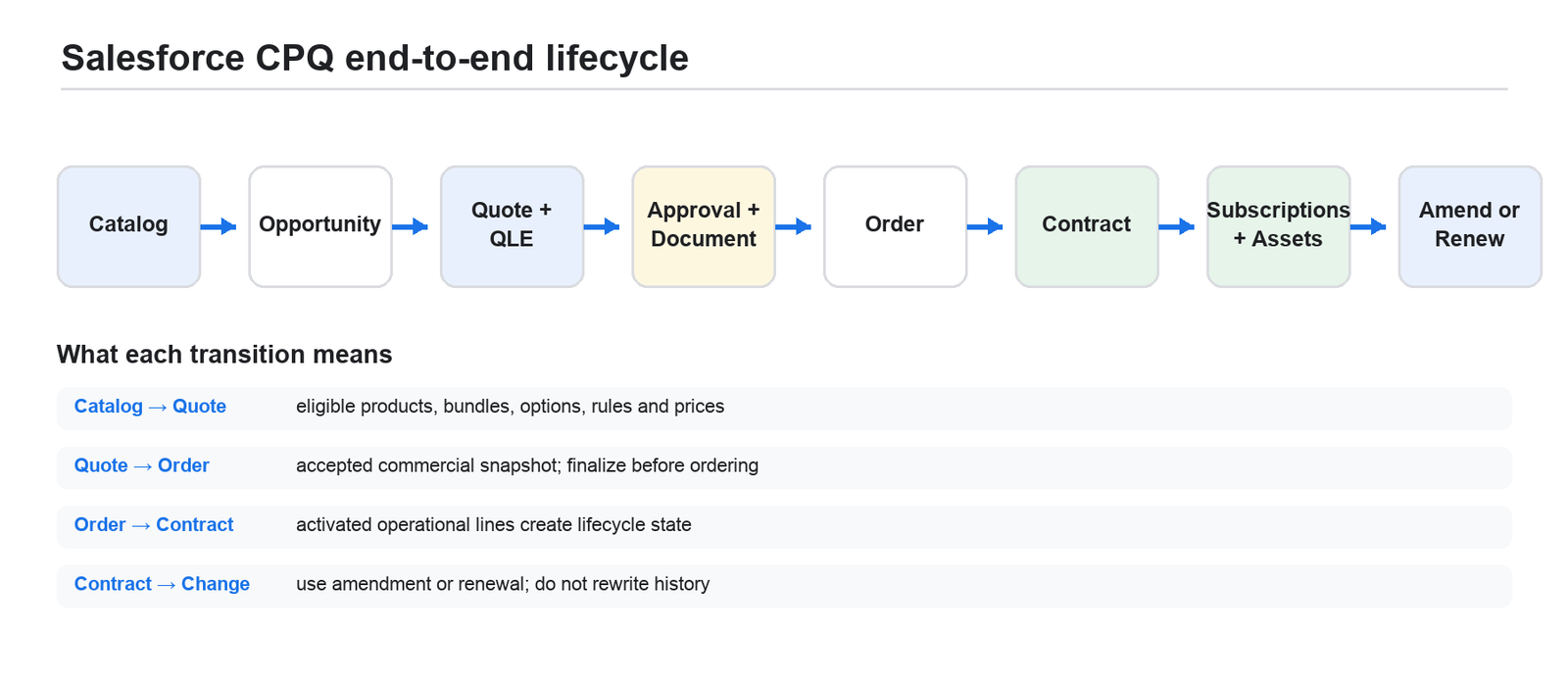
Figure 1. The commercial lifecycle coordinated by Salesforce CPQ.
Three engines, not one rules engine
The configuration engine determines whether a product combination is valid. Its main tools are bundle features, product options, configuration attributes, option constraints, and product rules. The pricing engine determines the commercial amount. Its main tools are price books, pricing methods, discount schedules, contracted prices, price rules, proration, and the Advanced Quote Calculator. The lifecycle engine converts an accepted offer into operational state and later reconstructs that state for amendments and renewals.
Keeping these engines separate is one of the most useful design disciplines in CPQ. A product rule should not be used merely to calculate a price. A price rule should not be used merely to hide an invalid option. A Flow that directly edits a Subscription is not an amendment. Each shortcut confuses ownership and makes later behavior harder to reason about.
Catalog truth and transaction truth
A Product record describes how an item is normally sold now. A Product Option describes how that same child product behaves inside one particular bundle. A Quote Line records how the item was proposed in one transaction. An Order Product records the accepted operational handoff. A Subscription or Asset records the customer’s contracted or installed state.
This separation explains why changing a Product does not safely rewrite an old quote. The quote line is an auditable snapshot. It also explains why editing an ordered quote is dangerous: downstream records were created from an earlier accepted snapshot and do not continuously resynchronize. CPQ preserves history by creating new lifecycle transactions rather than rewriting old ones.
DESIGN PRINCIPLE | Catalog data may change. Accepted transaction data should remain explainable. Use amendment, cancellation, upgrade, and renewal processes to create new commercial state instead of mutating the historical quote.
What CPQ does not replace
The managed package does not replace Sales Cloud. Account and Opportunity still provide customer and pipeline context. Product2, Pricebook2, and PricebookEntry remain the base catalog and list-price foundation. Salesforce security, automation, metadata, Apex, and APIs still govern the platform. CPQ adds specialized records and managed logic around that foundation.
CPQ also does not automatically become an ERP, fulfillment system, billing ledger, tax engine, revenue-recognition system, or contract lifecycle management platform. Those boundaries must be designed explicitly. The accepted quote is the commercial promise; downstream systems perform the operational and financial work.
Hands-on checkpoint
Open a CPQ-enabled sandbox and identify one Account, Opportunity, Quote, Quote Line, Product, PricebookEntry, Order, Contract, Subscription, and Asset. Do not change anything. Trace the lookup relationships and note which records are standard Salesforce objects and which use the SBQQ namespace. The purpose is to see the lifecycle before learning configuration.
Chapter summary
- Salesforce CPQ is a governed commercial transaction engine, not merely a quote screen.
- Configuration, pricing, and lifecycle behavior are distinct engines with different records and evaluation moments.
- Quote lines and downstream lifecycle records are snapshots; accepted history should be changed through governed lifecycle transactions.
Chapter 2 — Architecture and data model
The managed-package boundary
Salesforce CPQ is installed as a managed package whose objects, fields, Apex services, and UI components largely use the SBQQ namespace. The package coordinates four technical layers. Core Salesforce records provide accounts, opportunities, products, price books, orders, contracts, assets, security, automation, and integration capabilities. Managed-package records provide quotes, quote lines, bundle definitions, rules, schedules, templates, scripts, and subscriptions. Managed code and UI provide the Quote Line Editor, configurator, document generation, and lifecycle actions. The calculation service serializes a bounded quote model, calculates it in a JavaScript service context, and returns the resulting model to Salesforce.
This boundary has practical consequences. A field can exist on a record but be absent from the calculator payload. Direct DML on a Quote Line can invoke managed triggers and calculation. Field-level security can break behavior even when an administrator’s test succeeds. Custom automation on Quote, Quote Line, or Quote Line Group can compete with CPQ’s own transaction. A package upgrade can run post-install work that interacts with validations, triggers, and flows.
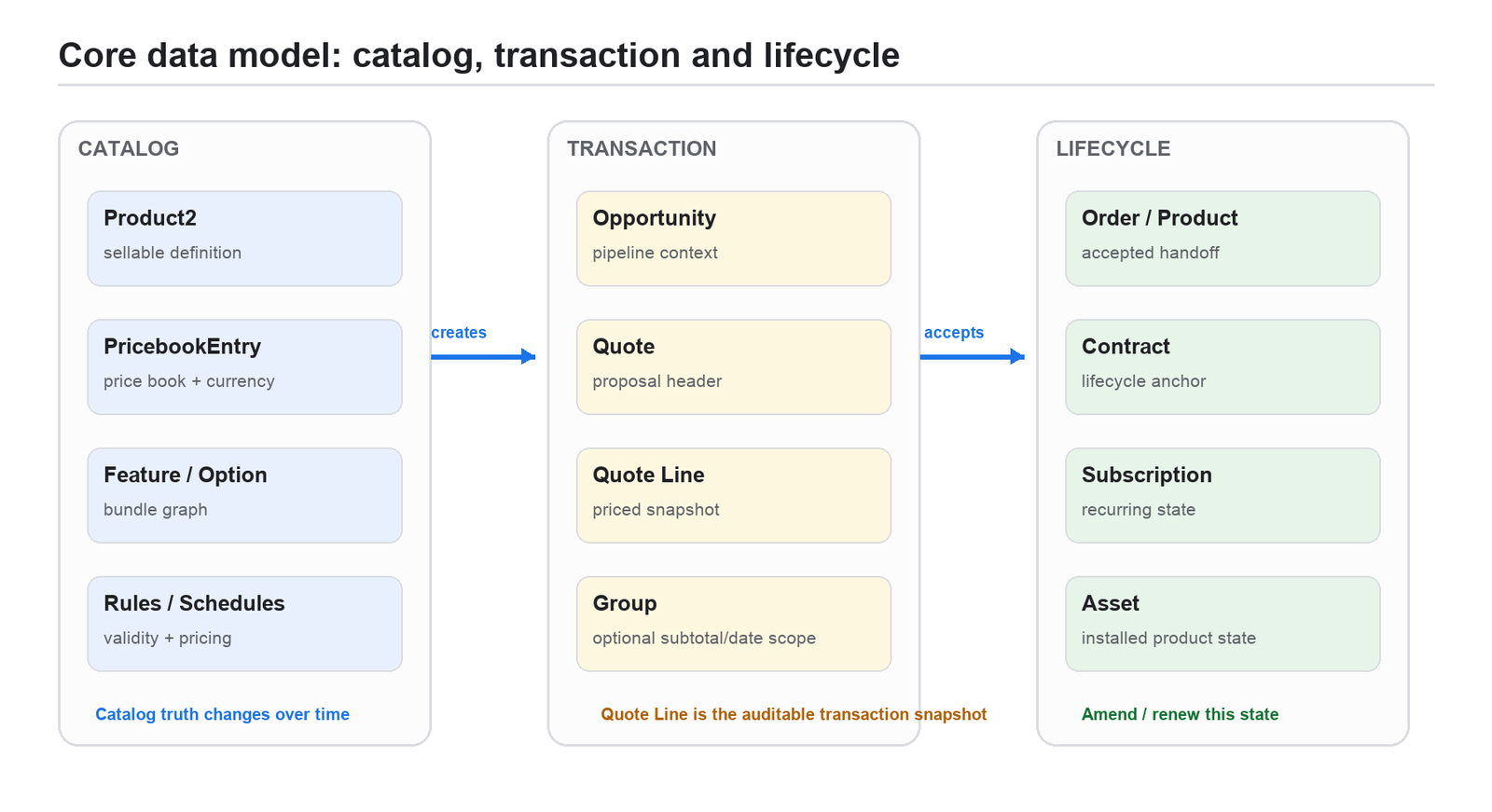
Figure 2. The catalog, transaction, and lifecycle layers of the managed-package object model.
The records you must know
Account owns customer context, the renewal model, contracted-price relationships, and co-term or master-contract context. Opportunity owns the sales pursuit and can contain several CPQ Quotes, although only one should be Primary. The CPQ Quote is the commercial header and the control record for dates, term, currency, price book, calculation, primary status, ordering, and contracting. Quote Lines are transaction snapshots of products. Quote Line Groups provide optional subtotal, date, discount, and solution grouping.
Product2 is the sellable definition. PricebookEntry makes that product sellable in a particular price book and currency. A bundle parent owns Product Features and Product Options. Configuration Attributes collect shared input, Option Constraints express simple dependencies or exclusions, and Product Rules provide conditional validation, alerts, automatic selection, and filtering.
Price Rules, Price Conditions, Price Actions, Summary Variables, Lookup Queries, Discount Schedules, Discount Tiers, Block Prices, Costs, and Contracted Prices supply pricing behavior. Quote Templates, Template Sections, Template Content, Line Columns, and Quote Terms create proposal output. Orders and Order Products represent accepted operational handoff. Contracts, Subscriptions, Assets, and coverage relationships represent continuing commercial state.
Layer | Primary records | Operational meaning |
Commercial context | Account, Opportunity, Price Book, currency, dates | Who is buying, which pursuit owns the quote, and which market context applies |
Catalog and configuration | Product, Price Book Entry, Feature, Option, Constraint, Attribute, Product Rule | What may be sold and which combinations are valid |
Transaction and pricing | Quote, Group, Quote Line, schedules, rules, contracted prices, calculator | The auditable offer and every step from catalog price to Net |
Lifecycle | Quote Document, Order Product, Contract, Subscription, Asset | What was presented, accepted, fulfilled, contracted, installed, amended, and renewed |
Primary quote synchronization
An Opportunity can contain alternative proposals, but only the Primary Quote represents the commercial picture that synchronizes back to the Opportunity. Eligible primary-quote lines can become Opportunity Products, and quote totals can update opportunity amount and forecast context. Changing the primary quote changes which proposal controls that picture.
Several conditions must align: quote and opportunity currencies must be compatible; price-book context must be valid; products and price book entries must be active; optional or excluded lines may not synchronize; and the running user needs field and object access. A quote that has already created an Order is no longer a free working draft.
Twin fields and creation-event mapping
CPQ copies selected values between related objects when compatible custom fields share the same API name and data type. Common paths include Product to Quote Line, Product Option to Quote Line, Quote to Order, Quote Line to Order Product, Quote Line to Subscription or Asset, and lifecycle state back to amendment or renewal Quote Lines.
Twin fields are event-driven mappings, not continuous bidirectional synchronization. The source must be readable, the target must be editable, picklist values and record types must align, and the mapping must be tested through the entire lifecycle. The existence of two same-named fields does not imply that every creation path or standard field participates.
COMMON FAILURE | An administrator creates a field on Product Option and Quote Line, sees the value during initial configuration, and assumes renewal will preserve it. The value later disappears because the Subscription or Asset layer did not receive a compatible twin field. Design the complete mapping chain before relying on the field.
A record-level debugging method
When behavior is wrong, start from the transaction and move outward. Inspect Quote and Quote Line values first because they are the calculator inputs and outputs. Then inspect Product, Product Option, PricebookEntry, pricing records, and rules that supplied those values. Finally inspect the created Opportunity Product, Order Product, Subscription, or Asset. This direction exposes the first incorrect state instead of guessing from the final total.
Chapter summary
- CPQ combines standard Salesforce records, managed-package records, managed UI/code, and an external calculation service.
- Product is catalog truth, Quote Line is transaction truth, and Subscription or Asset is lifecycle truth.
- Twin fields copy values at supported creation events; they are not automatic live synchronization.
Chapter 3 — The complete quote lifecycle
Administrative preparation
Before a seller can create a reliable quote, an implementation team prepares five layers. Access and package behavior establish licenses, permissions, calculation-service authorization, package settings, and user personas. Catalog work activates products and creates price book entries for every required currency. Configuration work creates bundle features, options, attributes, constraints, and product rules. Pricing work chooses native pricing methods, schedules, contracted prices, price rules, and any justified QCP logic. Governance and output work create approvals, quote templates, terms, storage, and downstream integrations.
The sequence matters. A sophisticated price rule cannot compensate for an incomplete price book. A well-designed bundle cannot be tested by a user who lacks field access. A beautiful quote template cannot prove that amendments preserve the commercial model.
Seller workflow from opportunity to saved quote
Step 1 — Establish quote context
The seller opens or creates an Opportunity, creates a related CPQ Quote, and confirms Account, Price Book, Currency, Start Date, End Date or Subscription Term, and any channel context. These header values are not decoration; they determine which products and prices are eligible and how subscription lines prorate.
Step 2 — Add products
The seller chooses Edit Lines to open the Quote Line Editor, then adds products through search, guided selling, favorites, a custom action, or an integration. CPQ evaluates product active state, price-book eligibility, currency, search filters, component-only behavior, and any MDQ price-dimension requirements before a product can be selected.
Step 3 — Configure bundles
When a configurable parent is added, the configurator presents features and options. Configuration Attributes collect seller input. Option Constraints and Product Rules change availability, make selections, display guidance, or block invalid state. Saving the configuration creates a parent Quote Line and child Quote Lines connected by package relationship fields.
Step 4 — Calculate
The calculator loads the relevant quote, group, line, product, option, pricing, schedule, contracted-price, rule, and plugin data. It evaluates formulas and price rules in documented stages, establishes bundle and subscription quantities, applies pricing methods and discounts, rolls up totals, and returns messages and calculated fields to the Quote Line Editor.
Step 5 — Review and save
The seller reviews quantity, dates, prices, discount, margin, grouping, messages, and totals. Calculate is the pricing authority. Quick Calculate intentionally skips important logic and is not final pricing evidence. Save persists the model. When the quote is Primary, eligible lines and totals can synchronize to the Opportunity.
Governance and customer presentation
The saved transaction is then evaluated against validation and approval policy. Material exceptions such as excessive discount, negative margin, nonstandard term, or unusual payment terms route to the appropriate approvers. Once approved, the seller generates a quote document from a template whose sections, line columns, terms, totals, and visibility rules represent the exact offer.
Acceptance commonly occurs through an e-signature integration, although CPQ itself does not become the legal contract repository merely because a document was generated. The organization must define which action establishes commercial acceptance and which evidence is required before ordering or contracting.
Acceptance and lifecycle state
There are two common contracting routes. In an order-led route, the accepted primary quote creates one or more Orders and Order Products. The relevant Order or Order Products are activated and contracted, producing or updating the Contract and creating eligible Subscriptions and Assets. In a direct opportunity-contracting route, an eligible primary quote is contracted through the Opportunity without an intermediate order. The order-led route is usually clearer when fulfillment, provisioning, ERP, billing, or asynchronous integration needs an explicit operational handoff.
Order Products do not continuously resynchronize from changed Quote Lines. Finalize the quote before creating the order. Once the accepted transaction has created lifecycle state, use the Contract’s Amend and Renew actions rather than editing the old quote.
Amendment and renewal preview
An amendment is a delta transaction against a Contract. CPQ reconstructs current commercial state as an amendment quote, the seller changes quantities or products for the remaining term, and calculation determines the positive or negative delta. The amendment must be accepted and contracted before lifecycle records change.
A renewal forecast creates pipeline visibility. Renewal Quoted creates a persistent CPQ Quote from renewable subscriptions so the seller can edit a real renewal proposal with bundle structure and pricing context. Evergreen subscriptions do not participate in the ordinary fixed-term renewal cycle.
First-quote lab
Create a simple Opportunity and Quote in a sandbox. Add one one-time product and one fixed-price subscription. Calculate, save, mark the Quote Primary, generate an Order, activate it, and contract it. Record every new record and lookup created at each step. Then amend the Contract and add one unit of the subscription. This lab is more valuable than memorizing twenty fields because it makes the lifecycle concrete.
Chapter summary
- Reliable quoting begins with licenses, catalog, configuration, pricing, and governance prepared in dependency order.
- Calculate evaluates the complete transaction model; Quick Calculate is only a preview.
- Ordering and contracting create snapshots and lifecycle state. Amendments and renewals create new transactions instead of rewriting accepted history.
PART II — MODEL WHAT YOU SELL
CPQ configuration begins with a commercial model, not with automation. The next three chapters show how to make products sellable, how to model bundles without creating unnecessary complexity, and how to choose between constraints, product rules, and guided selling.
Chapter 4 — Product and price-book architecture
Start with a product taxonomy
Before creating records, classify every sellable item. Decide whether it is standalone, a reusable option, a bundle parent, a one-time product, a renewable subscription, an evergreen subscription, an asset, or a combination explicitly supported by the design. Define the unit of measure, seller-entered quantity, delivered quantity, price basis, discount policy, document visibility, opportunity visibility, fulfillment behavior, and lifecycle behavior.
This taxonomy is not administrative overhead. It prevents one Product from being forced to behave as several incompatible commercial items. When an engineering component, a sellable SKU, and a billing charge represent different units, model those distinctions deliberately rather than hiding them inside names and formulas.
Product readiness
A product is sellable only when Product2 is active and an active PricebookEntry exists in the Quote’s exact Price Book and Currency. The Pricing Method, Subscription Pricing, Subscription Type, Subscription Term, Asset Conversion, Quantity Editable, Price Editable, Discountable, Configuration Type, and Configuration Event settings must agree with the commercial policy.
A common missing-product incident is not a search problem at all. The product is inactive, marked Component for standalone search, absent from the selected price book or currency, filtered by a search rule, or missing the Price Dimension required for an MDQ transaction.
Price books and currency
PricebookEntry supplies the normal list-price foundation for a product in a particular price book and currency. CPQ adds additional currency-sensitive records: Cost, Block Price, Price Dimension, amount-based Discount Tier, Consumption Rate, and some Contracted Price data. Multi-currency design therefore requires a completeness grid, not merely activated corporate currencies.
The primary Quote currency must match the Opportunity currency. Percentage discount schedules are generally currency-independent, but amount tiers are not. MDQ requires a matching Price Dimension for each supported currency. Cost-priced products require Cost records by currency. Contracted Price amounts apply only when currency conditions match. Advanced Currency Management dated exchange rates do not replace quote-currency pricing records inside CPQ.
IMPLEMENTATION STANDARD | Build a catalog completeness matrix by SKU, price book, currency, commercial term, and language. A product is not production-ready until representative new-business, amendment, renewal, document, and integration tests pass for every required combination.
Product governance
Treat the catalog as master data with named business ownership. Use stable external identifiers instead of display names as integration or migration keys. Apply effective dating or version products when changing the commercial meaning of an offer. Deactivate obsolete price book entries instead of deleting records already referenced by transactions.
Maintain a dependency map from Product to PricebookEntry, Feature, Product Option, Attribute, Constraint, Product Rule, pricing record, document behavior, and downstream mapping. Any catalog change that participates in bundles, percent-of-total coverage, contracted pricing, subscription lifecycle, or document visibility needs regression tests.
Catalog design workshop
Choose one product family and write a one-page commercial definition for each item. Include the buyer outcome, unit of measure, one-time or recurring treatment, price method, discount policy, asset or subscription result, renewal behavior, cancellation behavior, currencies, and downstream owner. Only after the definitions agree should records be created.
Chapter summary
- Product taxonomy and commercial units should be decided before configuration records are created.
- Product active state and PricebookEntry coverage determine basic sale eligibility; several CPQ pricing records are also currency-specific.
- Catalog changes must be governed because accepted transactions depend on historical snapshots and lifecycle expectations.
Chapter 5 — Bundles and the configurator
A bundle is a graph
A CPQ bundle is not a single record. It is a parent Product connected to Product Features and Product Options, with optional Configuration Attributes, Option Constraints, Configuration Rules, and Product Rules. When configured and saved, this graph becomes a parent Quote Line and related child Quote Lines.
The parent defines when configuration is allowed or required. Configuration Type controls whether the configurator can be entered, must be entered, or is disabled. Configuration Event determines whether it opens when the product is added, edited, or both. Large Configuration settings can change the experience for complex bundles, but they do not remove the need for a sound commercial model.
Features organize decisions
Features are seller-facing sections such as Platform, Users, Security, Services, or Support. Min Options and Max Options provide simple cardinality. A maximum of one can produce a single-choice interaction. The feature order should follow the seller’s decision sequence rather than the order in which records happened to be created.
Avoid combining unrelated choices solely to reduce record count. A well-designed feature tells the seller what decision is being made, includes concise guidance, and contains a manageable number of options. A large candidate set may need dynamic selection or product search rather than dozens of checkboxes.
Product Option semantics
Product Option is one of the most consequential records in CPQ because it defines how a child behaves in one bundle context. Number and Feature control placement. Selected is a default; Required is an invariant. Quantity and Quantity Editable control the seller’s input. Quantity relationship determines whether quantity follows or multiplies with the parent. Bundled changes price, quantity, and discount behavior; it is not a cosmetic hide-price flag. Discounted by Package controls whether a package-level discount affects the child. Quote Line Visibility controls whether the child appears in the editor, customer document, both, or neither.
Option Type expresses relationship semantics. Component is a true part of the package and normally follows parent quantity. Accessory depends on the parent but maintains an independently managed quantity. Related Product is a cross-sell with looser independence and cannot be required in the same way. Choose the type from commercial and lifecycle behavior, then verify the exact fields supported by the installed package version.
Configuration Attributes
A Configuration Attribute is a seller input backed by a target Quote Line field. Deployment region, edition, data-residency zone, service tier, and contract model are common examples. The Target Field determines data type. Apply Immediately can reevaluate the configurator after a change. Apply to Product Options can fan the value out to children.
When the value must survive reconfiguration and later lifecycle operations, create compatible twin fields across Product Option, Quote Line, and the required Subscription or Asset layer. Grant the configuration context read access to the source and edit access to the target. Test both directions because initial configuration and reconfiguration are separate events.
Constraints versus rules
Use an Option Constraint for a simple pairwise relationship. A Dependency makes one option available when another is selected. An Exclusion prevents two options from being chosen together. These relationships are clear, efficient, and local to the bundle.
Use a Product Rule when the outcome depends on several conditions, quote or account context, configuration attributes, reusable logic, or multiple actions. Constraint Group delimiter syntax is easy to misread, and constraints have limitations in dynamic option contexts. Treat the documented syntax as code and test every truth-table branch.
EXAMPLE | A Branch Security bundle contains one Appliance feature, one Licenses feature, and one Services feature. High Availability depends on a second appliance. Deployment Region is a Configuration Attribute. A Product Rule blocks US-only encryption when Region is EU. Another Product Rule automatically adds Installation when Onsite Deployment is selected.
Nested bundles
Nested bundles are powerful and expensive. Each nested parent introduces another configuration level and more Quote Lines. Rule scope becomes harder to reason about, quantity propagation becomes less obvious, and document, order, subscription, asset, amendment, and renewal hierarchy must be tested.
Prefer a shallow commercial bundle and send a separate technical bill of materials downstream unless sellers genuinely need to configure every level. Mirroring an engineering hierarchy inside CPQ often produces a technically elegant model that is operationally difficult.
Bundle lab
Build a parent with three features and four child options. Make one option required, one selected by default, one dependent on another, and one controlled by a Configuration Attribute. Configure every valid and invalid combination, change the parent quantity, save, reconfigure, clone, generate a document, order, contract, amend, and renew. Record any point at which hierarchy, quantity, or attributes are lost.
Chapter summary
- A bundle is a graph of parent, feature, option, attribute, constraint, and rule records.
- Required, Selected, Bundled, Option Type, and quantity settings have commercial and lifecycle meaning, not merely UI meaning.
- Shallow bundles are easier to explain, calculate, document, deploy, and preserve through amendment and renewal.
Chapter 6 — Product rules and guided selling
Product Rule anatomy
A Product Rule is a container. Error Conditions decide whether it matches or is violated. Product Actions define what a Selection Rule changes. A Configuration Rule attaches product-scoped logic to a bundle. Conditions can use All, Any, or Custom logic, and Selection Rules also have Evaluation Order for deterministic sequencing.
The four rule types serve different purposes. Validation blocks an invalid saved state. Alert communicates guidance without blocking. Selection adds, removes, hides, shows, enables, or disables options. Filter limits candidates in a dynamic selection context. The type should follow the business outcome rather than whichever record an administrator already knows how to configure.
Scope and evaluation event
Product scope operates in the configurator and can test option and configuration data. Quote scope operates over Quote Lines. A product-scoped rule cannot simply test any Quote Line field, and a quote-scoped rule does not have the same access to Product Option or Configuration Attribute records.
Evaluation events determine when the rule runs. Load initializes state when the configurator or quote opens. Edit responds to user changes. Save enforces final state. Always means every event supported for that rule type and scope, not every event in the product. Apply Immediately causes additional edit cycles and should be used only when the interactive response is worth the calculation cost and screen movement.
Reversible state
A Selection Rule executes its action when conditions are true. CPQ does not automatically infer the inverse behavior when the condition becomes false. A rule that adds or hides an option therefore needs a deliberate reverse rule, or a blank-slate reset pattern, when the seller can change the controlling input.
Treat dynamic configuration as a state machine. Define the forward transition, reverse transition, default state, and conflict behavior with other rules. A selection that remains stuck after a seller changes Region is not a user-training issue; it is an incomplete state design.
Conditions, summary variables, and lookup queries
Simple rules test fields directly. Advanced rules can use Summary Variables to aggregate filtered Quote Lines, Lookup Queries to match a transaction against a maintained matrix, and Configuration Attributes to test seller input. Be precise about scope. A lookup table should yield exactly one row for a valid transaction; overlapping rows create nondeterministic behavior.
Guided selling
Guided selling asks business questions before product selection and converts answers into search criteria. It is effective when sellers understand customer needs but do not know product codes. Typical prompts include deployment size, industry, regulatory requirement, geography, implementation timing, and service tier.
Guided selling narrows the candidate set; it does not replace bundle configuration. After the seller selects a product family, the configurator still resolves that product’s internal options, quantities, and rules.
A deterministic rule design method
Write the business statement in plain language before creating records. Identify the controlling object and field, the required scope, the earliest event at which inputs are valid, the action or message, the inverse behavior, and all overlaps with existing rules. Then build a truth table that covers every condition independently, boundary values, blank values, and interactions with earlier and later rules.
COMMON FAILURES | A rule never runs because it is inactive, attached to the wrong bundle, or evaluated at the wrong event. A rule works only after a second save because required data did not exist during the first event. Two rules fight because their action order and inverse behavior were never designed. A dynamic filter returns the wrong candidate because lookup rows overlap or omit currency and effective-date dimensions.
Chapter summary
- Choose Validation, Alert, Selection, or Filter from the business outcome.
- Scope and evaluation event determine which data exists and when the rule can act.
- Every dynamic Selection Rule needs explicit forward, reverse, default, and conflict behavior.
PART III — PRICE ACCURATELY
This part explains the commercial calculation engine in the order an experienced Salesforce professional should learn it. First understand the price waterfall, then choose the narrowest native pricing tool, and only then introduce Price Rules or JavaScript. The objective is not merely to produce the correct total. A professional CPQ design makes every adjustment traceable, reproducible, and explainable to Finance.
Chapter 7 — The price waterfall and native pricing methods
Why the waterfall is the central debugging model
Every Quote Line carries a sequence of price states. Those states preserve the origin of the price and the effect of each commercial adjustment. When a quote is wrong, looking only at Net Price hides the cause. The correct diagnostic method is to inspect the waterfall from left to right and identify the first unexpected value.
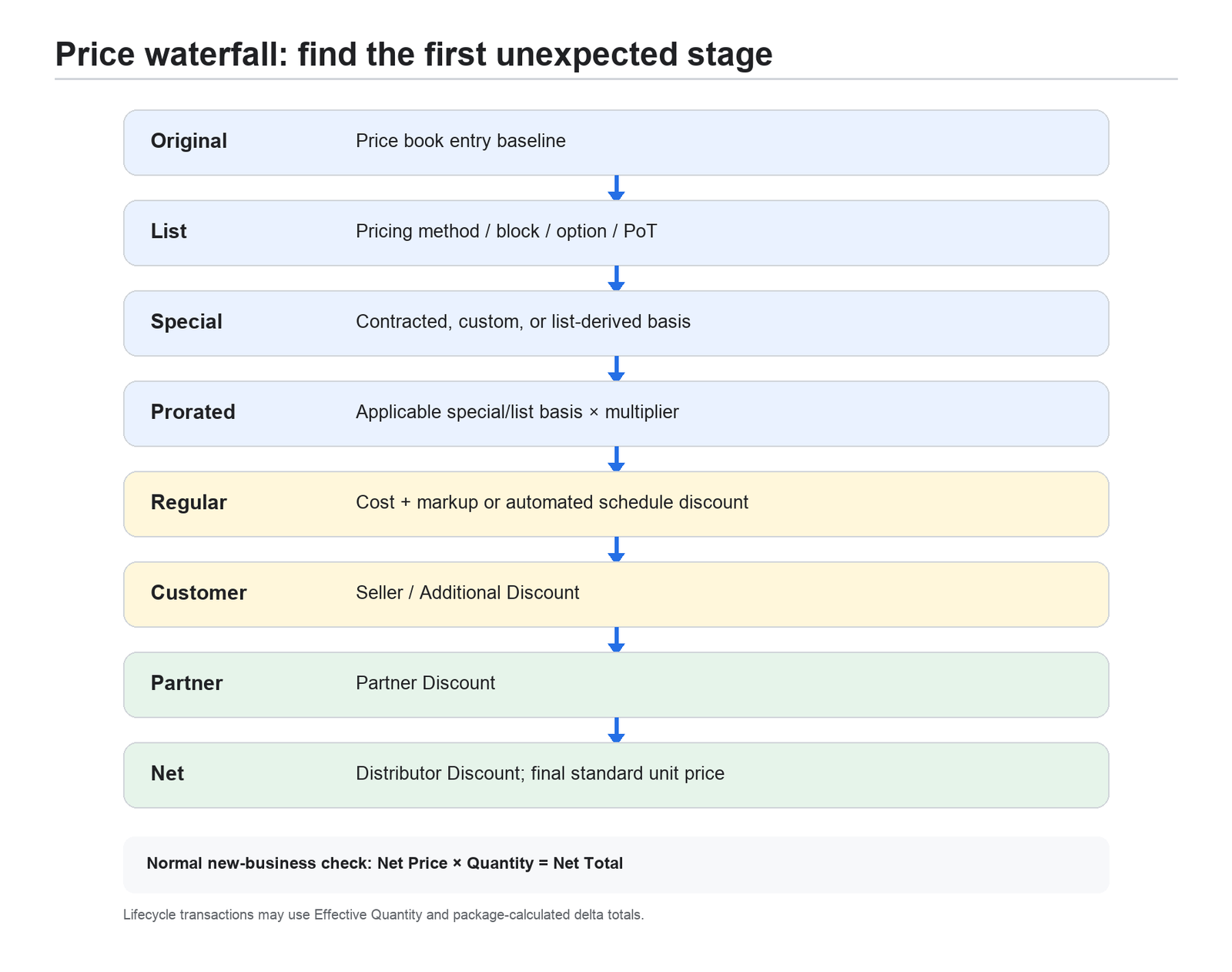
Caption: The CPQ price waterfall preserves the commercial reason for each adjustment.
The practical sequence is Original, List, Special, Prorated, Regular, Customer, Partner, and Net. Some objects and screens use unit-price field names while others display extended totals, but the conceptual order remains the same.
Original Unit Price is the unmodified baseline from the Price Book Entry. List Unit Price is the result of the selected pricing method, such as List, Block, or Percent of Total. Special Price is a contracted, custom, or list-derived basis when Special Price Type is populated. Cost-priced products bypass Special Price; Unit Cost plus Markup supplies Regular Price. Proration converts a subscription basis to the covered term. Regular Price reflects automated schedule discounts. Customer Price reflects the seller-facing additional discount. Partner Price reflects a partner discount, and Net Price reflects the last supported channel adjustment, including distributor discount where configured.
ARCHITECT’S NOTE | “List price” is overloaded in everyday conversation. In CPQ, the Price Book Entry, Original Unit Price, and List Unit Price can be different values. Use the exact field name when discussing a pricing defect.
A worked waterfall
Assume an annual software subscription with a Price Book Entry of USD 100 per user. The customer has a valid contracted price of USD 90. The quote covers 18 months, so the prorate multiplier is 1.5. A volume schedule applies 10 percent, the seller applies another 5 percent, and a partner receives 5 percent.
CPQ begins with Original Unit Price 100. Contracted pricing establishes Special Unit Price 90. The 18-month term produces a prorated basis of 135. The 10 percent schedule produces Regular Unit Price 121.50. The 5 percent seller discount produces Customer Unit Price 115.425. The 5 percent partner discount produces Net Unit Price 109.65375 before configured display rounding. At quantity 100, the extended net is approximately USD 10,965.38.
The calculation should retain each intermediate value. If an implementation replaces this with a single formula that writes USD 109.65375 directly to Net Price, the total may look correct while the commercial audit trail, renewal behavior, approval thresholds, and channel reporting become unreliable.
Choosing the native pricing method
Use the least complex mechanism that expresses the requirement. Native pricing methods participate in the documented waterfall and lifecycle more predictably than general-purpose automation.
Business requirement | Use this CPQ mechanism | Principal control or limitation |
Standard per-unit catalog price | Price Book Entry / List | Create an active entry for every supported price book and currency |
Child price differs in one bundle | Product Option Unit Price | Bundle context only; Bundled, Block, and Percent of Total precedence still matters |
Quantity or term tiers | Discount Schedule | Choose Range versus Slab and define aggregation scope and exclusive bounds |
Flat total for a quantity band | Block Price | The tier amount is a total, not a per-unit rate |
Cost plus seller or system margin | Cost pricing | Cost is currency-specific; protect missing cost and negative markup |
Account-negotiated future price | Contracted Price | Selected when the line is added; avoid overlaps and currency mismatch |
Fee on eligible covered products | Percent of Total | Write the inclusion policy and test MDQ segment behavior |
Conditional derived price or field | Price Rule | Choose the correct event; Evaluation Order is not dependency resolution |
Maintained region / tier / term matrix | Lookup Price Rule | Rows must be mutually exclusive and the candidate table must remain bounded |
Complex cross-line algorithm | QCP | Use supported hooks, explicit payload, Promises, idempotence, and versioned fixtures |
List and bundle-context pricing
List pricing is appropriate when a product has a normal per-unit amount in a price book. The Price Book Entry is currency-specific and provides the baseline. A Product Option can supply an Option Unit Price when the child has a different commercial amount only inside one parent bundle.
Several settings take precedence over an option override. A Bundled option is included in the parent price and normally contributes zero. Block and Percent of Total methods retain their own semantics. Test the final line rather than assuming that the closest-looking field wins.
Block pricing
Block pricing assigns a flat total to a quantity range. It is not a per-unit tier. If the range from 1 through 10 costs USD 5,000, quantity 7 still costs USD 5,000. Bounds must be complete and non-overlapping; the upper bound is exclusive.
Block pricing works well for platform editions, capacity bands, and packaged services whose price changes at defined thresholds. If the business instead wants every unit in a band to receive a different unit discount, use a Discount Schedule. If it wants an overage rate within a block, implement the documented Overage Rate pattern and test every lower and upper boundary.
Cost plus markup
Cost pricing begins with a currency-specific Cost record. CPQ adds the configured markup and supplies Regular Price. A missing cost is effectively zero, and negative markup can produce a price below cost. Protect the design with validation, permissions, and approval conditions.
The cost may be commercially sensitive. Sales users usually need the resulting margin decision, not unrestricted access to every cost record. Model visibility and approval authority deliberately.
Percent of Total
Percent of Total prices a product as a percentage of eligible lines. Typical uses are support, warranty, insurance, or management fees. Scope, category, inclusion and exclusion fields, and the selected base—List, Regular, Customer, or Net—determine the eligible amount. Minimum and maximum amounts can bound the result.
This method appears simple but requires a written inclusion policy. State which product families are covered, whether one-time products are included, which base is used, and how subscription lines behave. A native Percent of Total line over segmented MDQ products has special segment behavior; it does not necessarily equal a percentage of the aggregate visible MDQ total. Chapter 16 demonstrates when a governed QCP implementation is required instead.
Discount schedules
A Discount Schedule is reusable systematic discount logic. Range schedules apply one tier to the entire qualifying quantity. Slab schedules price the quantity in portions, so each tier applies only to units within its range. Aggregation Scope determines whether quantity is evaluated per line, across the quote, or within a group. Cross Orders can include qualifying assets in the aggregated quantity but does not retroactively reprice those assets.
For a range schedule with upper-exclusive bounds, tiers might be 1 to less than 100 at 0 percent, 100 to less than 150 at 10 percent, 150 to less than 200 at 15 percent, and 200 or more at 20 percent. Test exactly 99, 100, 149, 150, 199, and 200. Boundary testing is part of configuration, not an optional QA exercise.
Contracted prices
A Contracted Price represents negotiated future pricing for an Account and Product. It can hold either a price or a discount, not both, and it may be constrained by effective dates and filtering fields. CPQ normally selects it when the Quote Line is created. Editing the Contracted Price later does not rewrite an existing line automatically.
Avoid overlapping active records. A Contracted Price amount applies only when currency matches. Cost, Block, and Percent of Total have their own precedence or compatibility limits. When contracted pricing includes a Discount Schedule, it can override the schedule attached directly to the Product.
Manual, partner, and distributor discounts
Seller-entered additional discounts can be applied at Quote, Group, or Line level. The nearest applicable level wins: Line before Group before Quote. Optional special fields can support percent, currency, unit, or total discount units. Add only the modes the business will govern and explain.
Partner and distributor discounts occupy later waterfall stages. They should remain distinct from the customer negotiation because reporting, margin controls, approvals, and channel compensation often depend on that distinction.
Pricing design procedure
Step 1 — Write the commercial equation
Express the requested price using business language and sample numbers. Identify the baseline, quantity, term, customer entitlement, negotiated adjustment, channel adjustment, currency, and rounding policy. If Finance cannot agree on the equation, configuration should not begin.
Step 2 — Map each adjustment to a waterfall stage
Choose the earliest native stage that preserves meaning. A catalog amount belongs in the Price Book Entry. A quantity discount belongs in a Discount Schedule. A customer-specific future price belongs in Contracted Price. A seller exception belongs in Additional Discount plus approval.
Step 3 — Define boundaries and precedence
Document effective dates, currencies, quantity bounds, product scope, account scope, and interactions with every other pricing mechanism. Explicitly record which mechanism wins when more than one is applicable.
Step 4 — Build a golden calculation
Calculate the expected result outside CPQ with every intermediate stage visible. The golden calculation is a test oracle, not a replacement pricing engine. Use it to compare Quote Line fields after each configuration change.
Step 5 — Test lifecycle and permissions
Test new quote, clone, reconfiguration, amendment, renewal, multi-currency, large quote, background calculation, and the real seller persona. Pricing that works only for an administrator on a new quote is incomplete.
Chapter summary
- Diagnose pricing from Original through Net and stop at the first unexpected stage.
- Prefer native pricing methods because their commercial intent survives reporting and lifecycle operations.
- Treat currency, range bounds, precedence, proration, and rounding as governed design decisions.
Chapter 8 — Price Rules, calculator sequencing, and QCP
What a Price Rule is
A Price Rule conditionally writes a field during configuration or calculation. It contains conditions, at least one Price Action, an evaluation scope, an evaluation event, and an evaluation order. A Price Action obtains its value from one supported source: a literal, formula, source field, Summary Variable, or lookup result.
Price Rules are most effective for deterministic derived values and conditional commercial adjustments that do not have a better native pricing object. They are not a general workflow engine, and they do not make the calculator procedural.
Event before order
The calculator first separates rules by event. Within an event, lower Evaluation Order runs before higher order, and actions within a rule follow Action Order. Event selection is therefore more important than giving every rule a different number.
Conditions and Summary Variables for a stage are evaluated before that stage’s actions. A later rule at the same stage cannot safely assume that its conditions will see a field just written by an earlier rule. When a pricing result becomes correct only after the user clicks Calculate twice, the configuration has a timing defect.
The remedy is to move the dependent work to a later valid event, calculate from stable source inputs in one expression, persist the required input earlier, or implement the algorithm in QCP. “Train users to click Calculate twice” is never an acceptable design decision.
The documented calculation sequence
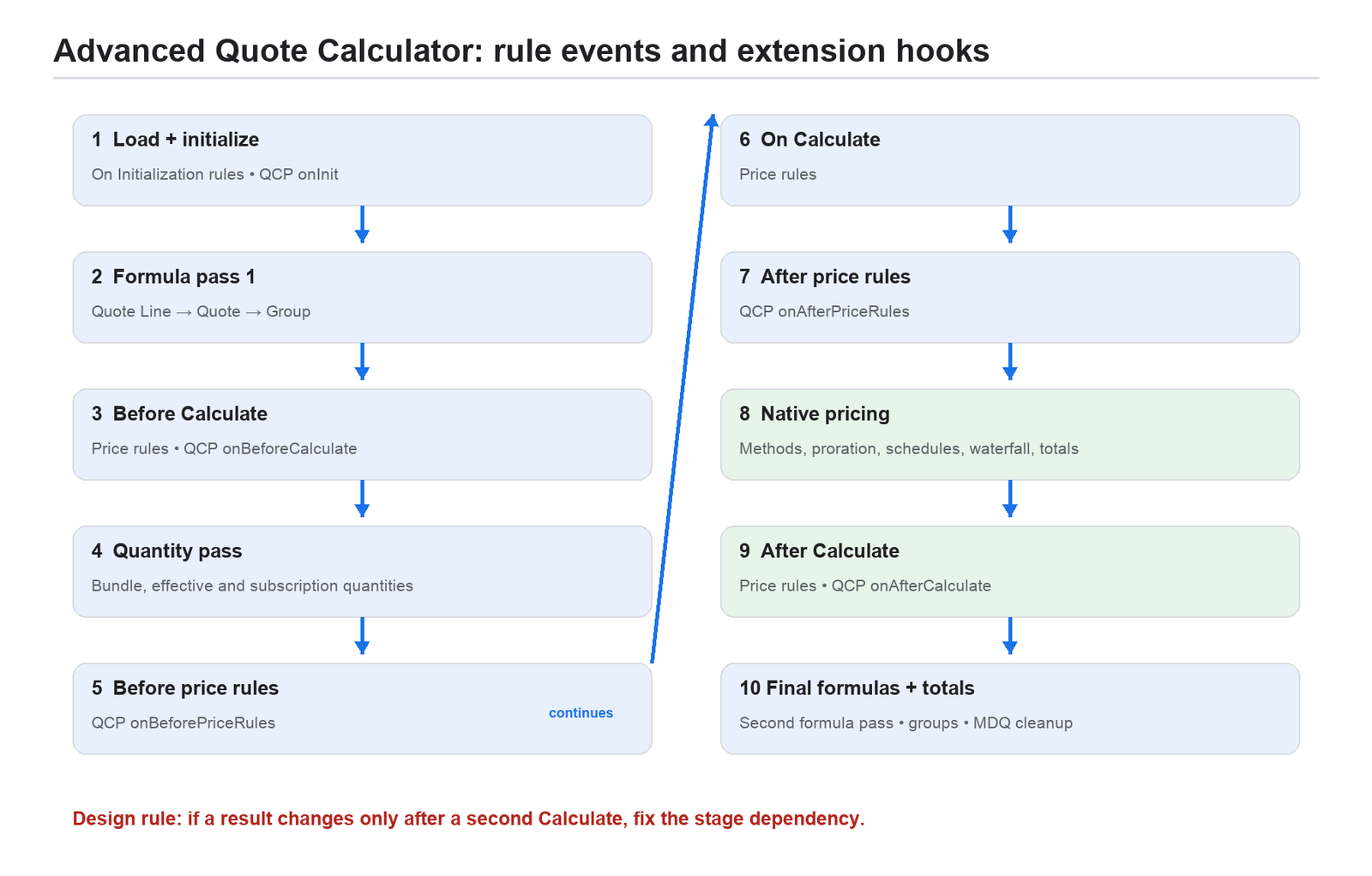
Caption: CPQ loads the quote, evaluates formulas and rules in stages, runs native pricing, and then refreshes totals.
At a practical level, calculation proceeds as follows. CPQ loads the Quote, Groups, Lines, products, relevant related data, formulas, rules, and scripts. On Initialization logic and QCP initialization run. Formula fields are evaluated. Before Calculate rules and the corresponding QCP hook run. CPQ derives component, effective, and subscription quantities. The before-price-rules hook runs, followed by On Calculate Price Rules. Native pricing establishes method-specific prices, proration, schedules, discounts, and totals. The after-price-rules hook runs. After Calculate rules and QCP run. Finally, formula fields and quote, group, line, and MDQ totals are refreshed.
The official sequence contains additional internal substeps, but three consequences matter in design. Formula fields can be evaluated more than once. Quantities are not final in the earliest stage. Native pricing occurs between rule and plugin stages, so a field written too early may be overwritten and a downstream price written too late may not cascade through the waterfall automatically.
Targeting price fields safely
When a Price Rule needs to establish a new price basis, prefer List Price or Special Price at the correct event rather than patching downstream calculated unit-price fields. If the rule sets Special Price, set Special Price Type to Custom as part of the same design. Preserve Original Price as the audit baseline.
An After Calculate Price Rule that changes a unit-price field generally needs another calculation before all internal pricing is accurate. Do not assume that a final totals refresh recreates the entire waterfall. If the business requires a single-pass algorithm after native calculations, implement and test the supported QCP pattern for the installed package version.
Summary Variables and lookup rules
A Summary Variable aggregates a filtered set of Quote Lines or related records. It can count, sum, find minimum or maximum, or return another supported aggregate. State the scope and filters precisely. A Summary Variable that unintentionally includes its own target product can make a fee recursively depend on itself.
A Lookup Price Rule evaluates quote or line attributes against a maintained table. It is appropriate for matrices such as region by tier by term. The candidate query can become expensive when the table is wide, large, or insufficiently filtered. Split unrelated matrices, retain only needed columns, and design rows so one transaction matches exactly one result.
Calculator payload
The advanced calculator does not serialize every custom field automatically. A field normally enters the model because an active rule or Summary Variable references it, it is listed in the Custom Script field configuration, or it belongs to a supported ReferencedFields field set. Adding a field “just in case” increases payload and can affect large-quote performance.
This explains a common defect: the field exists in Salesforce and a formula or script works for an administrator in one context, but the value is undefined in the calculator. Debug both record access and model inclusion.
When QCP is justified
Quote Calculator Plugin is custom JavaScript executed through documented hooks. Reserve it for calculations that are genuinely awkward or impossible to express reliably through native pricing and Price Rules: complex cross-line allocation, iterative algorithms, advanced MDQ aggregation, or single-pass adjustments after native pricing.
The seven documented hooks are onInit, onBeforeCalculate, onBeforePriceRules, onAfterPriceRules, onAfterCalculate, isFieldVisible, and isFieldEditable. The visibility and editability functions must not mutate pricing data. Field-level security still wins even when a plugin returns editable.
QCP code receives models whose Salesforce fields live under .record. It must mutate those models and return Promises where specified. Dates are strings. Related external fields are not automatically present. The same code must work in browser and Node calculation contexts. Arbitrary asynchronous callouts to non-Salesforce endpoints are unsupported, and supported remote work must remain within the documented time ceiling.
A production QCP standard
Keep the authoritative script in version control even though CPQ stores the active source in a Custom Script record. Prefer one modular script with small pure functions over a collection of unexplained fragments. Record the business owner, hook, inputs, outputs, currency and scale assumptions, and installed-package version.
Make every hook idempotent: running the same calculation twice with unchanged input must return the same result. Do not accumulate a fee by adding to the value already written in the previous pass. Derive it again from stable eligible inputs.
Build fixtures for blank fields, zero quantities, all supported currencies, MDQ segments, amendment lines, renewal lines, deleted lines, large quotes, and real permission personas. Execute tests against the installed package version in both relevant calculation contexts. Salesforce does not provide a complete managed-package QCP unit-test harness, so an implementation must create its own repeatable fixture strategy.
EXAMPLE | SecureCloud support is 15 percent of the aggregate Net amount of three renewable products, one of which is MDQ. Native Percent of Total multiplies MDQ contribution by segment count and does not implement this business equation. An onAfterCalculate QCP hook sums the eligible final Net totals once, writes the Support line’s required downstream price fields, returns a Promise, and is tested for idempotence. Chapter 16 provides the full case.
Calculator troubleshooting
If a value is wrong, first reproduce as the affected seller and record the Quote, package version, calculator mode, event, and input fields. Inspect the waterfall and identify the earliest wrong field. Confirm that rule scope and event match data availability. Check rule and action order, Summary Variable filters, lookup uniqueness, currency precision, and payload inclusion. Disable one custom layer at a time in a sandbox—QCP, Price Rules, then unrelated Flow or Apex—until the behavior changes. Reintroduce the smallest failing combination and add it to regression tests.
Quick Calculate is not a final-validation path. It deliberately skips Price Rules, parent-dependent Quote Line formulas, and rollups. A quote that looks different in Quick Calculate and full Calculate may be behaving exactly as configured.
Chapter summary
- The calculator is staged; Evaluation Order cannot repair a wrong event.
- A two-click result is a design defect signal.
- Control calculator payload and reserve QCP for algorithms that justify code-level governance.
Chapter 9 — Subscriptions, proration, and multidimensional quoting
Subscription identity
A Product becomes subscription-aware when Subscription Pricing is Fixed Price or Percent of Total. Subscription Type determines whether it is Renewable, One-Time, Evergreen, or supports an evergreen/renewable pattern. The package Subscription Term Unit is Month or Day and must align with the company’s commercial policy.
The Product’s Subscription Term is a default. When a Quote Line is created, CPQ copies it into Default Subscription Term. That line value is a transactional snapshot; later catalog changes do not automatically rewrite it.
How CPQ determines term
CPQ first looks for the most specific usable date pair: Quote Line dates, then Group dates, then Quote dates. If it cannot derive a term from dates, it uses the most specific Subscription Term in the same line, group, quote order. It compares the actual term with Default Subscription Term to produce a Prorate Multiplier.
This priority matters because a line-level start date can override a quote-level assumption. When a quote shows an unexpected multiplier, compare all six sources rather than inspecting only the Quote Start Date.
Proration methods
The package supports Month, Monthly plus Daily, Calendar Monthly plus Daily, Day, and Day with Calendar Month Weighted methods. They differ at partial months, month ends, and leap years. No method is universally correct; the right choice is the accounting policy approved by Finance and Legal.
Changing the proration method and recalculating an existing quote can change historical values. Treat it like a pricing-policy release. Capture representative dates, including February, leap day, 30-day and 31-day months, month-end starts, and terms that cross years.
WORKED EXAMPLE | An annual subscription has a Default Subscription Term of 12 months and List Unit Price USD 1,200. A clean 18-month term has a multiplier near 1.5 under a simple month basis, so the extended subscription basis is USD 1,800 before quantity and discounts. Partial-month methods can produce a different multiplier; never hard-code 18 divided by 12 when the org uses daily weighting.
MDQ mental model
Multidimensional Quoting segments one logical subscription into time slices, such as Year 1, Year 2, and Year 3. Each segment becomes its own Quote Line with a Segment Key, Segment Index, and time boundary. Quantity, discount, or price can ramp by segment.
MDQ is not merely a document layout feature. Segmentation affects calculation, Discount Schedules, Quote Lines, orders, subscriptions, amendment behavior, renewal reconstruction, APIs, and reporting. Create one Price Dimension per supported currency and verify segment boundaries for odd-length terms.
Pricing ramps
A quantity ramp changes quantity by segment. A price ramp changes price or discount. If a 36-month agreement uses annual dimensions, the seller might quote 100 seats in Year 1, 150 in Year 2, and 200 in Year 3. With Aggregation Scope None, a range Discount Schedule evaluates each segment independently rather than aggregating all 450 seats.
This distinction prevents accidental application of the highest tier to every year. The business must explicitly decide whether volume entitlement is per period, per quote, or per group.
MDQ and Percent of Total
Native Percent of Total over segmented MDQ follows documented segment behavior: the MDQ line subtotal contribution can be multiplied by the number of segments. Therefore, 15 percent of a screen-visible aggregate subtotal is not necessarily the native result. Do not compensate with an unexplained percentage or hidden manual discount. Either accept and document the native definition or implement the required aggregate equation as governed custom pricing.
Amendments and renewals of MDQ
An amendment effective inside a segment changes the remaining commercial state from that effective date. Test whether quantity and price are prorated for the partial segment, how untouched future segments are represented, and how resulting Subscription records retain segment identity.
Renewal behavior depends on product and package settings. A segmented renewal may use the first segment’s pricing logic in one design, while a de-segmented renewal may derive from the last relevant segment. This is commercially significant. Define expected renewal quantities, term, and price in advance, then test the installed version against those expectations.
Subscription design procedure
Step 1 — Define selling model
Decide whether the product is one-time, renewable subscription, evergreen, usage-oriented, or an MDQ ramp. Record term unit, default term, cancellation policy, and renewal treatment.
Step 2 — Define the date authority
Specify which layer—Quote, Group, or Line—owns dates and who can override them. Use validation to prevent contradictory date and term inputs.
Step 3 — Approve proration policy
Finance approves the package method and expected rounding. Build golden cases for full term, early start, late start, partial month, leap year, amendment, and co-term.
Step 4 — Define downstream identity
Choose Subscription and Asset conversion behavior, bundle root preservation, order route, renewal model, and the fields that must map forward. A price correct on the initial quote but unreconstructable on renewal is not a complete design.
Step 5 — Test lifecycle
Contract the quote, amend it at multiple points, generate a renewal, and compare the resulting hierarchy, quantities, dates, and prices with the golden specification.
Chapter summary
- Subscription term is derived from the most specific date or term source, and Default Subscription Term is a snapshot.
- Proration method is a governed accounting policy.
- MDQ changes the transaction and lifecycle model; every segment-sensitive requirement needs explicit tests.
PART IV — GOVERN AND EXECUTE THE DEAL
This part follows a calculated quote through approval, customer presentation, acceptance, ordering, contracting, amendment, and renewal. The governing principle is simple: once accepted commercial state has created downstream records, change it through lifecycle operations rather than rewriting history.
Chapter 10 — Approvals and quote documents
Approval is commercial governance
Approvals should represent named business risks, not a generic “large deal” gate. Common risks include discount depth, negative margin, nonstandard payment terms, unusually long term, legal exception, product compatibility override, and manual price entry. Each rule should have a business owner, objective condition, approver or chain, escalation path, effective date, and audit requirement.
Create an approval matrix before creating records. It should show the governed object and field, threshold, currency treatment, condition, step, serial or parallel behavior, approver, delegation, email, rejection path, recall behavior, and reapproval policy.
Managed-package Advanced Approvals
Salesforce CPQ Advanced Approvals is a separate managed package with its own namespace, licenses, permission requirements, rules, chains, templates, and API. Do not confuse it with the newer flow-based Advanced Approvals capability in Revenue Management. Search results and documentation can show both generations.
Install and upgrade the package deliberately. Users need the appropriate permission-set license and record access to the User records referenced as approvers. Experience Cloud users also require the relevant license. Test with actual submitter, manager, finance, legal, delegated approver, and administrator personas.
Rule design and Smart Approvals
Serial rules create a sequence; parallel rules allow independent decisions at the same level. Approval conditions should not overlap unintentionally. Multiple active rules for the same object and prior approval history can create surprising records, so activation must be controlled.
Smart Approvals can prevent reapproval when a condition has not changed. This depends on comparison state and the “Reevaluate Smart Approvals Individually” semantics. Test unchanged resubmission, changed discount, changed term, added product, recalled quote, rejected quote, and a quote that crosses back below a threshold.
Do not edit or activate rule sets while approvals are in flight without a migration plan. Changes can create or remove approval records independently of a new submission. Release approval configuration in a controlled window and reconcile active requests.
Approval email and audit
For managed Advanced Approvals, Visualforce email templates use the Approval record as the related object. The Approval ID must appear in the required position for email actions, even when visually hidden. Link templates through the package’s template records and test request, approve, reject, recall, and delegated action paths.
The approval record, comments, timestamps, decision-maker, and condition state form an audit trail. Keep approval logic separate from document rendering: an approved amount should not be transformed by a late calculation after approval without forcing a governed reapproval path.
Quote-template architecture
A customer document is assembled from a Quote Template, ordered Template Sections, Template Content, Template Line Columns, Quote Terms, and optional attachments. The database Quote is the commercial transaction; the generated PDF or Word file is a presentation of selected transaction data.
Design reusable content modules for cover, executive summary, commercial table, scope, terms, signature, and appendices. A template section is required for content to appear. Line-column widths should total 100 percent. Use precise field API names, scale, grouping, roll-up, and separate-line settings.
Document design procedure
Step 1 — Define document archetypes
Identify distinct outputs such as standard new-sale quote, channel quote, renewal notice, services statement, and amendment order form. Do not force one template to contain dozens of fragile conditional branches when the legal forms are materially different.
Step 2 — Map commercial truth to presentation
For every displayed amount, state the source field and desired scale. Decide which bundle parents and children appear, how optional and bundled lines are shown, how MDQ segments are presented, and which discounts may be disclosed.
Step 3 — Build reusable content
Create shared branded sections, legal text, and terms. Use merge syntax supported by CPQ and test nulls, HTML, picklist translations, and conditional terms. Keep static assets compressed and stored in an accessible folder.
Step 4 — Validate every boundary
Generate the smallest, typical, and largest quote. Test each currency, language, locale, page break, long product name, blank description, signature block, attachment, and output format. Word page-break behavior has limitations that differ from PDF.
Localization and currency presentation
Translation Workbench handles labels, picklists, and help text. Custom Labels support UI and error messages. CPQ Localization records translate supported record text such as products, features, options, templates, terms, and dimensions. Document generation supports Salesforce’s fully supported languages, not every platform language.
A DocumentCurrencySymbol special field can override symbols in CPQ currency fields within line output, but it does not automatically rewrite symbols inside HTML or arbitrary merge fields. Multi-currency document tests must therefore inspect both numeric value and presentation.
Document operations and failures
Use a controlled shared folder with appropriate user access. Do not save output in the SteelBrick template-resource folder. Very large folder counts, oversized images, invalid HTML, invalid color values, inaccessible assets, and broken sections can cause generation failures.
When a template fails, clone it in a sandbox and remove sections until generation succeeds. Reintroduce one component at a time. Inspect HTML and six-digit hexadecimal colors; data loaders sometimes transform a value such as 000000 into 0 unless imported as text.
Chapter summary
- Approval rules should correspond to named commercial risks and produce a complete audit trail.
- Managed-package Advanced Approvals and Revenue Management approvals are different products.
- Quote documents are modular presentations of database truth and require their own scale, localization, and performance tests.
Chapter 11 — Orders, contracts, subscriptions, and assets
The boundary between sale and fulfillment
An accepted quote becomes operational only when CPQ creates downstream records. This transition should be explicit because orders do not continually resynchronize with a quote that is edited later. Finalize and approve the quote before ordering, and freeze or govern fields whose change would invalidate downstream state.
Business event | Source state | Governed CPQ action | Result |
Competing proposal | Opportunity | Create another Quote; designate one Primary | Alternative commercial model without overwriting another proposal |
Accepted offer and fulfillment | Approved Primary Quote | Generate and activate Order | Order and Order Products become the operational handoff |
Committed subscription state | Activated Order or governed Opportunity route | Contract the transaction | Contract plus Subscription and Asset records |
Midterm change | Existing Contract | Set Amendment Start Date, then launch Amend | Delta Quote and revised contracted state |
End-of-term continuation | Contract and Subscriptions | Generate Renewal Opportunity and Quote | Future-term proposal with governed renewal pricing |
Termless continuation | Evergreen Subscription | Amend or cancel under the evergreen policy | Continuing service without a fixed-term renewal event |
The order route
In the common order-first route, the accepted Primary Quote is marked Ordered, directly or through its Opportunity. CPQ creates an Order and eligible Order Products. The Order is activated after downstream readiness checks. Marking the activated Order Contracted creates or updates a Contract and creates Subscriptions or Assets according to Product configuration.
This route is usually clearer when ERP, provisioning, taxation, fulfillment, or billing needs an explicit operational handoff. It also gives downstream integrations a stable object boundary.
The direct-contract route
Some organizations contract an eligible Opportunity directly. CPQ uses the Primary Quote to create the Contract and related lifecycle records without a separate fulfillment step. This can be appropriate for a narrow subscription flow but must be deliberately governed. Do not allow both routes casually; duplicate contracting paths create inconsistent assumptions in automation and support.
Order grouping
One-order mode produces one Order with an Order Product for each eligible Quote Line. When Allow Multiple Orders is enabled, lines can be divided manually, by Quote Line field, or through an approved grouping strategy. Grouping affects activation, partial fulfillment, contracting, invoicing, and reconciliation.
Define a deterministic grouping key such as legal entity, ship-to location, fulfillment date, or business unit. Verify that all lines required to preserve a bundle or subscription relationship travel together.
Subscription and Asset creation
Subscription products and eligible bundled components create CPQ Subscription records. Non-subscription products configured for Asset Conversion create Assets. These records become the source state for future amendments, renewals, upgrades, and cross-order aggregation.
Bundle hierarchy must survive the transition. CPQ uses relationship fields such as Required By on transactions and Root ID on lifecycle records. A bundle that must reconstruct later needs a qualifying parent Subscription or Asset. A zero-priced parent with neither Subscription Pricing nor Asset Conversion may disappear from lifecycle state even though the initial Quote looked correct.
Field mapping and twin-field expectations
CPQ copies supported standard and custom fields only at defined creation events. A field on Quote Line can map to Order Product, Subscription, Asset, and later renewal or amendment lines when matching API names, compatible data types, permissions, and supported object pairs exist.
This is event-driven copying, not a persistent synchronization framework. If a target exists before the source changes, changing the source usually does not backfill the target. Test initial order, partial order, contract, amendment, renewal, and cancellation for every custom commercial field required downstream.
Contracting prerequisites
Before contracting, verify that the Account, Opportunity, Primary Quote, price book, dates, currency, and Order path are valid. Confirm that intended subscription Order Products are activated, required bundle roots exist, Product subscription and asset settings are complete, validation and custom automation allow creation, and the integration identity has license, object, field, and record access.
Contracting invokes substantial managed logic and may be asynchronous. Avoid direct DML that attempts to manufacture Subscription or Asset state without CPQ’s supported service path.
Reconciliation after contracting
For every contracted transaction, reconcile Quote Lines to Order Products and then to Subscriptions or Assets. Compare product, quantity, effective dates, term, price basis, currency, Root ID, Required By relationship, source IDs, and custom mapped fields. Record exceptions before allowing an amendment or renewal.
Chapter summary
- Ordering freezes a fulfillment snapshot; later quote edits do not continually resynchronize it.
- Choose one governed order/contract route and define deterministic grouping.
- Bundle roots, field mapping, permissions, and conversion settings determine whether lifecycle state is reconstructable.
Chapter 12 — Amendments, renewals, evergreen, and co-terming
Why lifecycle operations exist
After a quote has produced a Contract, Subscriptions, or Assets, the organization has historical commercial state. Editing the original Quote would rewrite the proposal, not correctly represent a new commercial event. Amendments and renewals create new transaction records derived from that state while preserving lineage.
Amendment mental model
An amendment represents an in-term change. The user launches Amend from the Contract. CPQ creates an Amendment Opportunity and Quote, reconstructs the contracted products, and calculates changes from the amendment effective date. Additions, removals, upgrades, downgrades, and quantity changes become delta lines or revised state according to product and package behavior.
Before launching Amend, set the Contract Amendment Start Date to the intended effective date. Otherwise the process can use today’s date, changing proration and downstream meaning. If a quantity increases on the first day of Month 7 in a 12-month term, only the remaining six months should be priced under the approved proration policy.
Amendment procedure
Step 1 — Validate source contract
Confirm the Contract is the active source, dates and term are correct, Subscription and Asset records reconcile, bundle roots exist, and no conflicting amendment is already open.
Step 2 — Set effective date
Populate Amendment Start Date before launching Amend. Record why that date is commercially authoritative and prevent a later accidental change.
Step 3 — Change only intended state
Use the amendment Quote to add, remove, upgrade, or change quantities. Do not manually recreate existing products as new lines unless the business truly intends a new independent subscription.
Step 4 — Calculate and compare delta
Inspect the amendment line quantities, proration multiplier, price waterfall, and total. Compare the calculated delta with an independent expected-value worksheet.
Step 5 — Approve, order, and contract
Apply the same governance as a new sale. Contract the amendment through the chosen route and reconcile updated Subscription or Asset state.
Renewal mental model
A renewal represents continuation into a new term. The Contract can generate a Renewal Opportunity and Renewal Quote using its subscriptions, renewal settings, and products. CPQ reconstructs the eligible commercial state and applies renewal pricing rules.
Renewal Model should be chosen at the Account or governed package level. Contract Based is common because each Contract is renewed from its own state. Define renewal lead time, default term, uplift, price-book policy, and responsibility for opportunities and quotes.
Renewal pricing
Renewal Price can derive from List, Contracted, or the Subscribed Price according to Product settings. Uplift may be defined at Contract, Subscription, or Product level depending on design. State the precedence and test it; a renewal that silently returns to current list can create unexpected increases, while one that always copies old net price can bypass approved uplift.
For a custom calculated product such as aggregate Support, do not uplift the Support line independently and then recalculate it from already uplifted covered lines. Recompute Support once from the eligible renewed base and overwrite any native uplift for that line. This prevents double uplift.
Evergreen subscriptions
Evergreen products continue until cancelled and do not follow a fixed-term renewal in the same way. They require a clear cancellation, billing, entitlement, and amendment operating model. Do not label a product Evergreen merely to avoid renewal configuration; it changes the legal and operational promise.
Co-terming
Co-terming aligns an added or changed product with an existing contract end date. The amendment start date and master contract dates determine the short initial term. Verify proration, renewal inclusion, ramp behavior, billing schedules, and the customer document. A co-termed line that calculates correctly but renews as a separate contract defeats the objective.
Legacy versus large-scale services
Record whether the org uses Legacy or Large-Scale Amendment and Renewal services. The services have different prerequisites and operational behavior. Large-scale processing requires specific product and lifecycle settings; for subscription bundle parents, use a supported non-null Asset Conversion configuration where documented. Test the exact installed version and service, especially for deep bundles and high line counts.
Lifecycle test matrix
For every renewable product and bundle, test a clean new sale, quantity increase, quantity decrease, midterm add, complete cancellation where supported, component addition and removal, upgrade, co-term, early renewal, renewal after amendment, renewal with uplift, multi-currency, MDQ, and a second amendment after the first has contracted. Verify both calculated amounts and resulting record graph.
Chapter summary
- Amendments and renewals preserve commercial lineage; do not edit historical accepted quotes.
- Effective dates, source Contract state, pricing precedence, and bundle roots control lifecycle outcomes.
- Evergreen and co-term designs are operating models, not field shortcuts.
PART V — ENGINEER, DEPLOY, AND OPERATE CPQ
CPQ is a revenue system, not an isolated Salesforce feature. Its records combine product catalog, pricing policy, legal state, and fulfillment intent. The engineering discipline in this part is what keeps a correct demo from becoming a fragile production implementation.
Chapter 13 — Installation, security, environments, and deployment
Begin with a product-lifecycle decision
Before implementation, determine whether the organization is maintaining an existing managed-package estate, expanding it, remediating it, or planning migration. Record CPQ and Advanced Approvals package versions, licensing, support status, quote volume, countries, currencies, languages, channel users, integrations, and the required new-sale, amendment, renewal, cancellation, and co-term journeys.
For a new Salesforce monetization program, compare Revenue Management before selecting the managed CPQ package. For an installed base, the immediate goal may still be excellent CPQ operation while the roadmap defines when and how strategic capabilities move.
Environment strategy
Use a Full sandbox for representative testing, training, and UAT where possible. A Developer sandbox is useful for isolated metadata work but rarely contains the catalog, contracted prices, subscriptions, approvals, documents, and scale needed to validate CPQ behavior. A Partial Copy can help if its template deliberately preserves the relationship graph.
Keep at least one environment on the seasonal preview track and one on non-preview when the release calendar makes that useful. Refresh planning must preserve test personas, calculator authorization, integration endpoints, and data-generation scripts.
Installation and calculator authorization
Confirm org prerequisites such as Orders, CRM Content, Chatter, mail deliverability, and API access where edition-specific requirements apply. Install with the intended user-security option and approve required third-party sites. Monitor Installed Packages Refresh Status and Setup Apex Jobs until post-install scripts complete.
Authorize the New Calculation Service from CPQ package settings with a durable, non-human administrative or integration identity. The token is tied to that user. Deactivating the authorizing user can interrupt calculation. Document ownership, credential rotation, permission changes, and the reauthorization procedure.
After installation, create a simple active Product, Price Book Entry, Opportunity, Quote, and Quote Line. Calculate and save before adding customization. This smoke test separates package and service readiness from later implementation defects.
Licensing and permission model
Modern CPQ versions enforce the Salesforce CPQ Permission Set License. Assign the license and the job-appropriate CPQ access permission set; do not rely on profile permissions from an older package era. Remove licensed custom-object permissions from profiles where Salesforce guidance requires it, then apply CRUD, field-level security, sharing, and record access as additional layers.
System-context Flow does not bypass the initiating user’s CPQ license restriction. Integration and calculator users also require the license and object, field, and record access needed by the transaction. Advanced Approvals has its own license and access model.
Create a persona matrix for seller, sales manager, Deal Desk, Finance, Legal, partner seller, administrator, support analyst, and integration user. For each persona, test Add Products, configuration, calculation, discount entry, approval, document generation, order, contract, amendment, renewal, and restricted-field visibility. An administrator-only test provides almost no evidence about production security.
Package settings as controlled configuration
Inventory every package setting across Documents, Groups, Line Editor, Plug-ins, Pricing and Calculation, Subscription and Renewal, and Quote behavior. For each setting, record current value, intended value, business reason, owner, dependency, test case, and rollback action.
Settings can alter calculation, payload, lifecycle, and document behavior across every transaction. They deserve the same review and release evidence as code. Do not make a production package-setting change during troubleshooting without recording it and reproducing the effect in a sandbox.
Multi-currency foundation
Decide corporate, user, and transaction currencies before loading pricing configuration. Every supported quote currency needs the required Price Book Entries. Cost-priced products need Cost records by currency. Block Price, amount Discount Tier, Price Dimension, and applicable Contracted Price data are also currency-specific. Percentage schedules can be currency-independent.
Primary Quote currency must match Opportunity currency. Advanced Currency Management dated exchange rates do not price CPQ Quote Lines; the transaction uses currency-specific pricing records. Build a completeness grid across SKU, price book, currency, segment, term, and language.
Metadata versus configuration records
CPQ setup is split. Fields, layouts, field sets, permission sets, classes, Flows, labels, and related artifacts are metadata. Products, options, features, rules, schedules, templates, and many approval records are Salesforce data. Change sets and ordinary metadata pipelines do not automatically move the record configuration.
This boundary is the source of many failed deployments: a Price Rule arrives without its conditions, a Product Option points to a source-org ID, or a Quote Template lacks content. Use external IDs and a dependency-aware migration process.
Recommended deployment sequence
The following order is a practitioner synthesis rather than a single Salesforce-prescribed manifest. It reflects lookup dependencies and should be adapted to the org.
- Install and align package versions. Deploy objects, fields, picklists, field sets, layouts, permissions, labels, automation, and QCP source.
- Load currencies, reference Accounts or Users where configuration requires them, and stable lookup data.
- Load Product2, then the Standard Price Book entries required before custom price-book entries.
- Load custom Price Books and Price Book Entries for each currency.
- Load Features, Product Options, Option Constraints, Configuration Attributes, and bundle-attachment records.
- Load Costs, Block Prices, Discount Schedules and Tiers, Price Dimensions, Contracted Prices, and lookup matrices.
- Load Product Rules and Price Rules with their child conditions, actions, Summary Variables, and lookups. Keep activation off until the graph is complete.
- Load search filters, Custom Actions, templates, sections, content, line columns, terms, localizations, and approval configuration.
- Migrate transaction records only when the project explicitly requires them, in lifecycle order with full relationship mapping.
Release validation
After each stage, reconcile record counts, external IDs, active flags, lookups, currency coverage, and orphaned children. Run one known Quote before loading the next layer. At the end, recalculate golden quotes and compare every waterfall stage, document, approval path, Order, Subscription, Asset, amendment, and renewal.
For a bulk Quote Line migration, follow the documented controlled-maintenance pattern only when needed: disable the relevant CPQ triggers for the load, re-enable them immediately, and force recalculation of affected Quotes in a safe batch size. This is not a normal integration technique.
Chapter summary
- A supported environment and durable calculator identity are foundational dependencies.
- CPQ license, CRUD, FLS, sharing, and payload access all matter.
- CPQ configuration is data as well as metadata, so promotion requires external IDs, dependency order, and reconciliation.
Chapter 14 — APIs, integrations, Billing, and automation boundaries
Use CPQ services, not record imitation
Managed objects are visible through Salesforce APIs, but direct DML is not a substitute for CPQ business logic. Adding a Quote Line record manually does not necessarily configure a bundle, calculate price, apply rules, or construct the relationship graph.
Use supported ServiceRouter operations and API models. A typical programmatic quote flow reads a Quote, reads a Product model, adds or configures products, calculates, validates, and saves. The sequence matters because each step returns a model containing state required by the next.
ServiceRouter and models
ServiceRouter exposes supported global read, load, and save methods to Apex, Visualforce remoting, and REST consumers. The public API classes route requests to named services; integrations should not call undocumented internal handlers.
QuoteModel contains Quote, Quote Line Group, and Quote Line model state. ProductModel contains Product, options, features, configuration attributes, and related data required by configuration. Treat API models as contracts and serialize the expected versioned shape. Avoid building an integration that depends on incidental internal properties.
Programmatic quote procedure
Step 1 — Establish transaction context
Create or read the Opportunity and Quote with Account, Price Book, currency, start date, and term. Confirm the integration identity has a CPQ license, access permission set, CRUD, FLS, sharing, and access to all referenced catalog records.
Step 2 — Read Product models
Use the Product Reader for each selected Product in the Quote’s price book and currency. For bundles, provide configuration inputs through the supported configuration model rather than inserting child lines manually.
Step 3 — Add products
Use the Add Products service. For several products, ignoreCalculate=true can defer calculation until additions are complete. Supply a group key when placement matters.
Step 4 — Calculate and validate
Call the Calculate service and handle its asynchronous or callback behavior for the installed version. Quote-scoped Product Rules may require the supported callback flow. Calculate Quote is not a general batch endpoint and is not guaranteed to complete instantly at scale.
Step 5 — Save and reconcile
Validate the model, save through ServiceRouter, then read back the Quote. Compare line IDs, groups, required-by relationships, quantities, prices, messages, and totals with the request. Do not treat a successful HTTP response as commercial reconciliation.
Idempotency and retries
The managed CPQ API documentation does not define a universal CPQ-specific idempotency key or retry guarantee. Add those controls in the integration layer. Assign a correlation ID and stable business request ID, record completed operations, and prevent a timeout retry from adding the same product twice.
Classify errors into validation, permission, lock contention, transient platform failure, timeout, and data defect. Retry only safe transient categories with bounded backoff. Re-read the Quote before a retry because another user or process may have changed it.
Concurrency and record locks
Quote calculation and save are stateful. Parallel requests against the same Quote can produce row locks or last-writer conflicts. Serialize mutations per Quote, keep transactions small, and use optimistic version checks in the integration layer. Record the calculation request, result, duration, and final Quote revision for support.
TriggerControl
CPQ exposes a supported mechanism to disable package triggers for the current Apex transaction. This does not disable the organization’s Flow, Apex, validation rules, or other managed packages. Use it only for a tightly controlled operation followed by the required supported recalculation or service call. Never make trigger disabling a blanket performance solution.
Flow and Apex boundaries
Use Flow for orchestration around CPQ: creating tasks, routing events, updating non-calculated business fields, or calling supported services. Do not use record-triggered automation to compete with the calculator by repeatedly changing Quote Line price or quantity fields during save.
Apex is appropriate for supported service integration, validation that does not belong in CPQ rules, data quality, and carefully designed orchestration. Keep high-volume synchronous automation off Quote, Quote Line, and Quote Line Group where possible. Every DML action on those objects can cause managed triggers, formulas, calculation, Flow, and custom code to interact.
Salesforce Billing boundary
Salesforce Billing can consume contracted and ordered commercial state to create billing schedules, invoices, credit notes, payments, and revenue-related outputs according to its product version and configuration. CPQ determines what was sold and at what commercial terms; Billing determines how eligible order state becomes financial transactions.
Before integrating, define the handoff object, activation prerequisite, billing type, billing frequency, charge type, tax provider, invoice grouping, proration alignment, usage data source, cancellation credit policy, and accounting reconciliation. A correct Net Total is not enough if billing frequency or effective dates are absent downstream.
Keep product terminology version-specific. The managed Salesforce Billing package and newer Revenue Management capabilities are not interchangeable, even when documentation uses similar revenue terms.
Integration observability
For each operation, log correlation ID, Quote ID, user, service name, package version, start and finish time, request outcome, retry count, error class, and downstream IDs. Redact sensitive commercial data where necessary. Build reconciliation reports that find Quotes marked Ordered without Orders, active Orders without expected Contracts, and contracted lines without Subscription or Asset state.
Chapter summary
- Use supported CPQ services and models; direct DML cannot reproduce configuration and calculation semantics.
- Serialize mutations per Quote and design idempotency, retry, and reconciliation outside the package.
- Keep automation and Billing boundaries explicit so each system owns a defined part of the revenue lifecycle.
Chapter 15 — Testing, performance, troubleshooting, and operations
A golden-quote test strategy
CPQ testing should be organized around commercial archetypes rather than isolated fields. A golden quote contains known inputs and independently calculated expected outputs for configuration, every waterfall stage, totals, approval route, document, order, contract, amendment, and renewal.
Choose archetypes that represent most production complexity: simple one-time sale, renewable bundle, customer contracted pricing, cost-plus product, block pricing, Percent of Total, multi-currency, MDQ ramp, channel discounts, services plus subscription, amendment, co-term, evergreen, and a maximum-size quote.
Layers of testing
Configuration testing validates features, options, constraints, attributes, and Product Rules. Pricing testing validates native methods, Price Rules, QCP, currency, dates, boundaries, and rounding. Lifecycle testing validates Orders, Contracts, Subscriptions, Assets, amendments, and renewals. Security testing uses real personas. Integration testing covers retry, timeout, locking, and reconciliation. Document testing covers content and visual output. Performance testing measures realistic and maximum transactions.
Test area | Representative evidence | Exit criterion |
Catalog and configuration | Eligibility matrix, bundle truth table, forward/reverse rules, reconfiguration and clone | Every valid combination succeeds; every invalid state is blocked or explained |
Pricing and subscriptions | Golden waterfalls, currencies, tier bounds, dates, proration, MDQ, repeated Calculate | Zero unexplained monetary difference and a stable one-pass result |
Approvals and documents | Submit/reject/recall/resubmit; every template, locale, null, and size | Complete audit trail and approved customer-facing output |
Lifecycle | New sale, Order, Contract, Subscription, Asset, amendment, co-term, renewal | Record graph, hierarchy, dates, quantity, and price reconcile |
Security | Seller, manager, Deal Desk, Finance, Legal, partner, admin, integration personas | Least privilege and no administrator-only behavior |
Integration and migration | Service contract tests, retries, locks, ID crosswalk, orphan checks, recalculation | Idempotent processing and reconciled source-to-target state |
Performance and operations | Typical, p95, maximum quote, document, concurrency, recovery drill | Targets pass with limits headroom and an owned support runbook |
UAT exit criteria
A professional exit requires zero unexplained monetary differences. Every rule must fire exactly once at the intended event. Approval, document, security, new-sale, amendment, and renewal journeys must pass. Performance results need headroom against platform and service limits. Sales Operations, Finance, Legal, and downstream system owners sign the evidence relevant to their area.
Salesforce does not publish a universal managed-package automated regression suite or QCP test harness. Build the organization’s own suite from production archetypes and retain it for every package, platform, catalog, and pricing release.
Large Quote behavior
Large Quote Threshold is not merely a visual preference. At the configured threshold, CPQ can send only essential Quote Line data and ignore quote-scoped Product Rules. Quote Batch Size trades per-transaction governor consumption against additional round trips. The documented default is not a universal recommendation for every org.
Measure with real bundle depth, formula count, lookup tables, QCP, custom automation, and user permissions. Do not promise a maximum supported line count from a generic benchmark; Salesforce does not publish one universal safe number.
Performance engineering
Begin with a baseline for QLE load, configuration save, Calculate, Save, document generation, order creation, contracting, amendment launch, and renewal generation. Record median, 95th percentile, maximum, and failure rate for representative sizes.
Reduce redundant automation on Quote, Quote Line, and Quote Line Group. Keep calculator payload fields intentional. Narrow lookup tables. Avoid Apply Immediately where the experience does not need instant feedback. Prefer shallow bundles. Remove duplicate formula and roll-up work. Choose batch settings from evidence and rerun the full commercial test suite after every optimization.
Troubleshooting ladder
Step 1 — Reproduce the exact user path
Capture user, persona, Quote ID, time, browser, package version, calculator mode, line count, and the button or API operation. An administrator opening the same record later is not the same reproduction.
Step 2 — Check platform and package health
Review Salesforce Trust, known issues, licenses, permission sets, CRUD, FLS, sharing, API limits, calculator authorization, calculation region, post-install Refresh Status, and Apex Jobs.
Step 3 — Identify the failing layer
Determine whether the symptom begins in catalog eligibility, configuration, Product Rules, Price Rule timing, calculator payload, QCP, custom automation, document template, order/contract prerequisites, or downstream integration. Use the earliest-wrong-state method rather than changing multiple settings.
Step 4 — Reduce to a minimal reproduction
Clone the Quote in a sandbox. Remove unrelated lines, rules, script functions, Flow, or template sections one at a time. Compare small versus large Quote behavior and full Calculate versus Quick Calculate.
Step 5 — Fix and prove regression
Implement the smallest correction in a sandbox. Run the directly affected case, adjacent cases, the golden suite, permissions, lifecycle, and maximum-size test. Record root cause and prevention in the operational knowledge base.
Common symptom map
A missing product usually points to inactive Product or Price Book Entry, wrong price book or currency, Component-only status, search filters, or a missing MDQ dimension. A price correct only after a second Calculate points to stage dependency. Admin-only success points to license, CRUD, FLS, sharing, calculator user, or payload. Lost attributes after reconfiguration point to twin-field configuration. Small-quote success and large-quote failure point to reduced payload, ignored quote rules, batching, or transaction limits. Infinite QLE loading can arise from malformed relationship data, automation recursion, script errors, or unsupported null values.
Upgrades and release operations
Inventory CPQ and Advanced Approvals versions and read every intervening release and patch note. Older estates can require intermediate upgrade paths and permission-set-license readiness work. Back up configuration records, QCP, metadata, package settings, and representative transactions.
Upgrade a representative sandbox first. Monitor post-install scripts and Apex Jobs, reauthorize the calculation service when required, compare settings and security, then run the full golden, lifecycle, document, integration, and scale suites. Schedule production off peak, smoke test immediately, and reconcile critical records.
Managed-package rollback is not equivalent to reverting an ordinary metadata deployment. Prepare a configuration restoration plan and a Salesforce Support path before production installation.
Operational governance
Assign a CPQ Product Owner, Catalog and Pricing owner, Salesforce platform owner, Sales Operations owner, Finance, Legal, Integration, Security, Release Manager, and Support owner. Separate authoring and production activation where practical.
Maintain a configuration registry with external ID, record type, business purpose, business owner, technical owner, scope, event, evaluation order, effective dates, dependencies, test case, and retirement date. Source-control metadata and QCP, export configuration records each release, and prohibit untracked production edits except a documented break-glass process.
Review data quality and conflicting rules monthly, performance and limits quarterly, and platform/package release readiness seasonally. Track quote cycle time, approval SLA, manual exceptions, discount leakage, calculation failures, document failures, amendment accuracy, renewal accuracy, and integration reconciliation.
Chapter summary
- Test commercial archetypes across configuration, calculation, governance, document, and lifecycle—not isolated fields.
- Large Quote behavior changes payload and rules, so scale tests are functional tests.
- Troubleshoot by finding the earliest wrong state, reducing to a minimal reproduction, and proving regression.
PART VI — APPLY THE MODEL
Chapter 16 — SecureCloud: a complete worked implementation
Business scenario
SecureCloud sells a three-year branch-security platform to Acme Manufacturing. The package contains a renewable deployment parent, a physical gateway, renewable encryption and audit services, an MDQ seat subscription that ramps each year, aggregate premium support, and one-time onboarding.
Acme requires EU deployment. If encryption is selected, audit logging must also be selected. Seat pricing receives per-segment volume discounts and a 5 percent seller discount. Premium Support must equal 15 percent of the aggregate Net total of Encryption, Audit, and every Seat segment. The deal will be ordered, contracted, amended in Month 7, and renewed with 5 percent uplift on ordinary renewable products.
Before building the quote, set Acme Account Renewal Model to Contract Based. Record whether the org uses Legacy or Large-Scale Amendment and Renewal service. The bundle parent is renewable so CPQ can preserve lifecycle hierarchy; when Large-Scale service is used, configure the documented non-null Asset Conversion value as well.
Product design
SKU | Role | Commercial model and price | Lifecycle design |
SC-DEPLOY | Deployment bundle parent | Renewable fixed-price parent, USD 0, 12-month default | Creates the parent Subscription; use documented non-null Asset Conversion for Large-Scale service |
SC-GATE | Physical gateway | One-time asset, USD 20,000; Accessory, Min Quantity 1 | Asset Conversion One per Quote Line |
SC-ENC | Encryption service | Renewable, USD 30,000 per year | Child Subscription; selection requires Audit |
SC-AUDIT | Audit logging | Renewable, USD 12,000 per year | Required child Subscription while Encryption is selected |
SC-SEAT | User seats | Renewable MDQ, USD 1,200 per user per year; 100 / 150 / 200 ramp | Segmented Subscriptions with per-segment range tiers |
SC-SUPPORT | Premium support | Renewable custom price: 15% of eligible aggregate Net | QCP recomputes on new sale, amendment, and renewal; no double uplift |
SC-IMPL | Onboarding | One-time service, USD 15,000 | No renewal; document and order as implementation service |
SC-DEPLOY is the parent. It uses Fixed Price Subscription Pricing, Renewable Subscription Type, Default Term 12, and a zero amount. For Large-Scale Amendment and Renewal, use Asset Conversion One per Quote Line when required by the installed version. The parent exists commercially to preserve the bundle root through Contract, Subscription, amendment, and renewal.
Create three Features: Platform, Security Services, and Commercial Services. Place SC-GATE in Platform; SC-ENC, SC-AUDIT, and SC-SEAT in Security Services; SC-SUPPORT and SC-IMPL in Commercial Services.
Define Product Options deliberately. SC-GATE uses Option Type Accessory, Min Quantity 1, editable quantity, and Asset Conversion One per Quote Line. SC-ENC, SC-AUDIT, and SC-SEAT use the chosen Component or Accessory semantics consistently with whether their quantity should multiply with the parent; for this example, the parent quantity remains 1 and each child’s seller quantity is independently meaningful, so Accessory is the clearer choice. SC-SUPPORT and SC-IMPL are also independent-quantity commercial children. Test the same choices through amendment and renewal rather than relying on initial-quote appearance.
Configuration rule
Create a Selection Product Rule named ENC requires AUDIT. Its Product Scope event is Edit and Save as appropriate for the desired interaction. An Error Condition detects when SC-ENC is selected.
The forward Product Action is implementable as a package record: Type Add, Product SC-AUDIT, Required true. If the UI should reveal a hidden option at the same time, use the documented combined Show and Add behavior instead. Create an inverse rule for the false state with Type Remove, Product SC-AUDIT, Required false, unless Audit is independently selected for another reason. Test forward, reverse, load, reconfiguration, and a conflict with a seller-selected Audit line.
Add a Validation Product Rule for Region. If Deployment Region is EU and a US-only encryption edition is selected, block save with a message that states the incompatible option and allowed replacement.
Seat pricing configuration
Create three yearly Price Dimensions for SC-SEAT in USD. Create a Range Discount Schedule with Aggregation Scope None so every MDQ segment is evaluated independently. Add upper-exclusive tiers: 1 to less than 100 at 0 percent, 100 to less than 150 at 10 percent, 150 to less than 200 at 15 percent, and 200 or more at 20 percent.
The quote uses quantity 100 in Year 1, 150 in Year 2, and 200 in Year 3. The Price Book Entry is USD 1,200 per seat per year. After the schedule and a 5 percent seller discount, the calculations are:
- Year 1: 100 × 1,200 × 90% × 95% = USD 102,600.
- Year 2: 150 × 1,200 × 85% × 95% = USD 145,350.
- Year 3: 200 × 1,200 × 80% × 95% = USD 182,400.
The aggregate Seat Net Total is USD 430,350. Boundary tests at 99, 100, 149, 150, 199, and 200 prove that the upper bounds and per-segment aggregation are correct.
Encryption and Audit pricing
SC-ENC is USD 30,000 annually and SC-AUDIT is USD 12,000 annually. Over three full annual segments or a 36-month non-segmented term under the approved proration method, their totals are USD 90,000 and USD 36,000 respectively. Their quantities remain 1.
The aggregate eligible renewable Net base is therefore:
Seat 430,350 + Encryption 90,000 + Audit 36,000 = USD 556,350.
Why native Percent of Total is not used
The business requirement is 15 percent of the aggregate eligible Net total. Native Percent of Total over MDQ follows segment multiplication behavior. In this scenario, the native eligible base would treat the MDQ Seat subtotal 430,350 across three segments as 1,291,050, then add Encryption 90,000 and Audit 36,000. The resulting native base would be 1,417,050, producing Support of USD 212,557.50—not the required USD 83,452.50.
This is not a rounding issue. It is a different business definition. The implementation therefore uses a governed QCP algorithm for SC-SUPPORT.
Support QCP design
Run the logic in onAfterCalculate, after ordinary eligible lines have final Net amounts. Filter only SC-ENC, SC-AUDIT, and all SC-SEAT segment lines. Exclude the SC-SUPPORT line itself, SC-GATE, SC-IMPL, deleted lines, and unrelated products. Sum the eligible extended Net totals once and calculate 15 percent using the approved currency scale.
Write all downstream price fields required by the installed-version fixture so the single calculation returns internally consistent Support price and totals. Return a Promise. Recompute from inputs on every pass rather than adding to the prior Support value. Add the exact Quote and Quote Line fields to the Custom Script payload and confirm field-level access.
The expected Support amount is 556,350 × 15% = USD 83,452.50. Test browser and server calculation, repeated Calculate with unchanged input, one segment quantity change, removal of Encryption and its dependent Audit, amendment lines, renewal lines, null values, and large-quote mode. The test passes only when a second Calculate produces no change.
Complete quote result
SC-GATE contributes USD 20,000. SC-IMPL contributes USD 15,000. The complete expected Net Total is:
Seat 430,350 + Encryption 90,000 + Audit 36,000 + Support 83,452.50 + Gateway 20,000 + Onboarding 15,000 = USD 674,802.50.
Reconcile every component with Quote Line fields and the generated document. The document should present the three-year ramp without suggesting that Support is a native per-segment fee.
Calculator trace
- CPQ loads Quote, Groups, Lines, MDQ segments, rules, schedules, and script fields.
- Initialization and the first formula pass establish stable source context.
- Before Calculate logic runs.
- CPQ derives option, effective, and subscription quantities.
- Before-price-rules QCP logic and On Calculate Price Rules run.
- Native pricing applies List values, MDQ dimensions, per-segment Discount Schedule tiers, seller discount, and Net totals.
- After-price-rules logic completes any supported adjustments.
- QCP onAfterCalculate derives aggregate Support from the eligible final Net base and returns its Promise.
- After the hook’s Promise resolves, Quote Line formulas and Quote and Group totals refresh.
Approval and document
Create an approval rule for the 5 percent seller discount only if it crosses the organization’s threshold; the example does not assume that every discount needs approval. A second rule can govern aggregate term or total contract value. Document which rule protects which risk.
The customer document shows platform, annual Seat ramp, renewable services, Support basis statement, one-time products, subtotal, tax if applicable, and total. It includes effective dates and explicitly distinguishes annual segment quantities from the three-year total commitment.
Order and contract
Mark the approved Quote Primary, generate the final document, and mark it Ordered through the governed route. Confirm one Order and the expected Order Products. Activate the Order, then contract it.
Reconcile a parent Subscription for SC-DEPLOY, child Subscription records for SC-ENC, SC-AUDIT, SC-SEAT segments, and SC-SUPPORT, an Asset for SC-GATE, and the intended one-time treatment for SC-IMPL. Verify Root ID and Required By hierarchy. If Large-Scale service is enabled, confirm the parent’s Asset Conversion prerequisite and resulting relationship state.
Month 7 amendment
Before launching Amend, set Contract Amendment Start Date to the first day of Month 7. Increase Year 1 or the current-period Seat quantity by 20 according to the actual segment boundary. Under a simple six-month remaining period and Year 1 pricing, the conceptual Seat delta is 20 × 1,200 × 90% × 95% × 6/12 = USD 10,260. The installed proration method and MDQ boundary determine the production value.
QCP must recompute Support from the amendment’s eligible delta base using the tested lifecycle model. It must not add 15 percent of the full historical contract again. Inspect generated Subscription changes after contracting the amendment.
Renewal
Generate the Renewal Opportunity and Quote from the Contract. Apply 5 percent uplift to ordinary renewable products according to approved renewal precedence. Validate how MDQ segments reconstruct and whether renewal uses segmented or de-segmented behavior.
SC-SUPPORT is not separately uplifted. QCP recomputes it as 15 percent of the eligible renewed Net base after ordinary lines’ renewal pricing is established, overwriting any native Support uplift. This prevents the 5 percent increase from being applied twice.
Acceptance checklist
- The EU configuration rule adds required Audit and reverses predictably.
- All price-book, cost, dimension, and schedule data exists for the Quote currency.
- MDQ segment quantities and tier boundaries produce 102,600, 145,350, and 182,400.
- Support calculates once to 83,452.50 and remains unchanged on a second Calculate.
- The complete new-sale Net Total is 674,802.50.
- Approval history and the customer document match calculated truth.
- Order, Contract, Subscription, Asset, Root ID, and custom-field reconciliation pass.
- Month 7 amendment and renewal produce the specified delta and uplift behavior.
Chapter summary
The case demonstrates the full CPQ reasoning chain: commercial requirement, product model, configurator behavior, native pricing, a justified custom algorithm, calculation sequence, governance, document, order, contract, amendment, and renewal. The important artifact is not the final total; it is the traceable design that can reproduce the total through every lifecycle event.
Chapter 17 — A practical implementation and learning roadmap
A 12-week learning path for an experienced Salesforce professional
This sequence assumes strong Salesforce fundamentals but no CPQ experience. It combines conceptual study with one evolving build so that every chapter produces working evidence.
Weeks 1 and 2 — Transaction and data model
Build Products, Price Book Entries, Opportunities, Quotes, Groups, and Lines. Use the QLE as a seller. Trace Primary Quote synchronization, calculation triggers, and document generation. Draw the record graph from the first quote to Order and Contract.
Weeks 3 and 4 — Configuration
Build one bundle with Features, Options, constraints, Configuration Attributes, and all four Product Rule types. Test forward and reverse state, reconfiguration, clone, and permission personas.
Weeks 5 and 6 — Pricing
Implement List, Block, Cost, Percent of Total, Discount Schedule, and Contracted Price examples. Record every waterfall field. Add a Price Rule only after mapping its event and source data. Reproduce and then repair a deliberate two-calculate defect.
Weeks 7 and 8 — Subscriptions and lifecycle
Build fixed-term, evergreen, and MDQ products. Test full and partial terms, leap-year dates, order, contract, asset conversion, amendment, co-term, renewal, and uplift.
Weeks 9 and 10 — Governance and output
Create a discount and legal-term approval matrix. Build and test managed Advanced Approvals if licensed. Create a modular quote template and validate several currencies, languages, content lengths, and PDF output.
Weeks 11 and 12 — Engineering and operations
Use ServiceRouter to create and calculate a Quote. Implement one justified QCP function with fixtures. Migrate a configuration set with external IDs. Run large-quote performance tests, complete a troubleshooting exercise, and produce an operations runbook.
A production implementation roadmap
Phase 1 — Discover and decide
Document product-generation choice, commercial scope, lifecycle journeys, currencies, channels, integrations, expected size, security, and success measures. Exit with a signed architecture and product-roadmap decision.
Phase 2 — Establish foundation
Install and authorize the package, configure security, inventory settings, establish environments, define data standards, and load a minimal catalog. Exit when every persona can complete a simple quote appropriately.
Phase 3 — Model catalog and configuration
Build Products, Price Books, bundles, attributes, constraints, rules, and guided selling. Exit when the configuration truth table and lifecycle bundle tests pass.
Phase 4 — Implement pricing
Approve equations and waterfall mapping, then implement native methods, rules, matrices, and only necessary QCP. Exit with signed golden calculations across currency, term, quantity, and permissions.
Phase 5 — Govern and present
Implement approvals, templates, translations, and document security. Exit with Finance and Legal approval and measured generation targets.
Phase 6 — Complete lifecycle and integration
Implement Order, Contract, Subscription, Asset, amendment, renewal, Billing, and external integrations. Exit when reconciliation and failure recovery pass.
Phase 7 — Validate, release, and operate
Run regression, UAT, security, migration, and performance evidence. Train role-based users, execute cutover, monitor, and transition to service ownership.
Definition of done
A CPQ capability is done when the seller path is understandable, the calculation is independently provable, the price waterfall preserves intent, approval and document state agree, downstream records reconcile, amendment and renewal work, real personas have least privilege, scale targets pass, deployment is repeatable, and an owner can diagnose failure without reverse-engineering undocumented production edits.
Where to continue learning
Begin with Salesforce CPQ Basics and Learn Salesforce CPQ Admin Fundamentals on Trailhead. Use the official Help pages and Developer Guide for version-specific behavior. The retired-or-retiring CPQ Administrator exam outline remains a useful syllabus for an installed base, while Salesforce recommends the Revenue Cloud Consultant path for forward-looking credentials. Certification should follow implementation practice, not replace it.
Final perspective
Salesforce CPQ becomes manageable when every requirement is placed in the correct layer. Catalog records define what may be sold. Configuration determines what combination is valid. The calculator turns that state into commercial value. Approvals govern exceptions. Documents present the accepted truth. Orders, Contracts, Subscriptions, and Assets preserve it. Amendments and renewals change it without erasing history.
The strongest CPQ practitioner is not the person who knows the most package fields. It is the person who can explain why a result exists, which record owns it, when it is evaluated, how it is deployed, and whether it survives the entire customer lifecycle.
APPENDIX A — DECISION GUIDES
A.1 Choose the configuration tool
Use an Option Constraint for a simple pairwise dependency or exclusion inside one bundle. Use a Configuration Attribute for a seller input that must drive configuration and persist. Use a Validation Rule to block an invalid saved state, an Alert Rule for guidance, a Selection Rule for conditional option state, and a Filter Rule for a dynamic candidate set. Use Guided Selling when the seller knows customer needs but not product codes.
A.2 Choose the pricing tool
Use a Price Book Entry for standard catalog price, a Product Option override for bundle-specific child price, a Discount Schedule for quantity or term tiers, Block Price for a flat quantity-band total, Cost pricing for cost plus markup, Contracted Price for customer-specific future pricing, and native Percent of Total only when its exact eligible-base and segment semantics match the business equation.
Use a Price Rule for a deterministic conditional field or price-basis update. Use a Lookup Price Rule for a maintained matrix. Use QCP only for a real declarative gap such as a complex cross-line algorithm. Seller-entered exceptions require controlled editability plus approval.
A.3 Choose the downstream action
Use another Quote for a competing proposal still under negotiation. Use Order for accepted fulfillment state. Use Contract for committed subscription state. Use Amendment for a midterm change. Use Renewal for continuation into the next term. Use an evergreen model only when service intentionally continues until cancellation. Correct contracted state through governed lifecycle operations rather than editing the historical Quote.
APPENDIX B — GOLDEN TESTS AND DIAGNOSTIC REFERENCES
B.1 Price diagnostic order
- Is Original Unit Price correct for the Product, Price Book, and currency?
- Did the selected native method establish the expected List Price?
- Did a contracted or custom price change Special Price, or did cost plus markup establish Regular Price?
- Did proration establish the expected term-adjusted basis before Regular Price?
- Did the Discount Schedule create the expected Regular Price?
- Did seller discount create Customer Price?
- Did partner discount create Partner Price?
- Did distributor discount create Net Price?
- Did quantity, scale, and rounding create the expected extended total?
B.2 Minimum golden-quote suite
- Simple one-time Product in every supported currency.
- Fixed subscription for full term, partial month, leap-year crossing, and co-term.
- Bundle defaults, valid combinations, invalid combinations, reconfiguration, clone, order, contract, amendment, and renewal.
- Every Discount Schedule boundary and aggregation scope.
- Block price lower and upper boundaries.
- Contracted Price start, end, overlap, currency mismatch, and account filtering.
- Cost plus positive, zero, negative, and missing cost conditions.
- Percent of Total inclusion, exclusion, category, minimum, maximum, and MDQ behavior.
- Price Rule event and one-pass result.
- QCP null, repeated calculation, browser, server, large quote, amendment, and renewal fixtures.
- Approval submit, approve, reject, recall, resubmit, delegation, serial, parallel, and Smart Approval branches.
- Document smallest, typical, largest, language, currency, null, image, term, PDF, and Word cases.
- Order, partial grouping, Contract, Subscription, Asset, amendment, cancellation where supported, renewal, and reconciliation.
B.3 Production support record
For every incident, record timestamp, user and persona, Quote ID, package versions, calculator mode and authorization user, line and segment count, action taken, error text, earliest wrong field, relevant rules or script version, logs, minimal reproduction, correction, regression cases, and whether a Salesforce Support case is required.
APPENDIX C — GLOSSARY
Advanced Approvals
The separate managed package that evaluates approval rules, creates approval records, and supports chains, Smart Approvals, delegation, and email actions for the CPQ generation discussed in this guide.
Amendment
A transaction derived from a Contract that represents an in-term commercial change from a defined effective date.
Asset
A downstream record representing an eligible non-subscription product or configured installed-base item.
Bundle
A parent Product plus Features, Product Options, constraints, Configuration Attributes, and rules that model a configurable commercial package.
Contracted Price
An Account-and-Product-specific price or discount used for qualifying future Quote Lines.
Discount Schedule
A reusable range or slab definition that applies systematic discounts based on quantity or term.
MDQ
Multidimensional Quoting, which segments a subscription across time so quantity, price, or discount can change by period.
Price waterfall
The ordered price states Original → List → Special → Prorated → Regular → Customer → Partner → Net.
Primary Quote
The one Quote on an Opportunity designated to synchronize commercial totals and products with the Opportunity.
Product Rule
A configuration or quote rule of type Validation, Alert, Selection, or Filter.
QCP
Quote Calculator Plugin, custom JavaScript executed through documented hooks in browser and server calculation contexts.
QLE
Quote Line Editor, the seller interface for product selection, line editing, calculation, grouping, and quote save.
Quote Line
The transactional snapshot of a sold product, quantity, configuration, dates, pricing states, and lifecycle identity on a Quote.
Renewal
A transaction derived from Contract and Subscription state that represents continuation into a future term.
Subscription
A CPQ lifecycle record representing a contracted renewable, evergreen, or otherwise subscription-aware product.
Twin fields
Compatible custom fields with matching API names on supported object pairs that copy values during defined record-creation events.
APPENDIX D — OFFICIAL SALESFORCE LEARNING AND REFERENCE LINKS
Product direction and foundation
- Navigating the Future of Salesforce CPQ: Product End of Sale, Not End of Life explains Salesforce’s current managed-package position.
- Salesforce CPQ Developer Guide is the entry point for supported CPQ APIs and current product notice.
- Salesforce CPQ Basics introduces the transaction and seller workflow.
- Learn Salesforce CPQ Admin Fundamentals provides the official administration trail.
- CPQ Object and Term Glossary defines package terminology.
Installation, security, and settings
- Install or Upgrade Salesforce CPQ covers installation and calculation-service authorization.
- Guidelines for Setting Up Salesforce CPQ covers setup and sandbox guidance.
- Salesforce CPQ Package Settings links package-setting groups.
- Salesforce CPQ Readiness for Permission Set License Assignment explains modern license enforcement.
- Data Restrictions Are Enforced for Access Permission Sets describes standard CPQ access permission sets.
Catalog, bundles, and rules
- Product Pricing Overview for Salesforce CPQ introduces product pricing.
- Product Bundles in Salesforce CPQ explains bundle construction.
- Manage Your Bundles in the Configurator is the configurator reference.
- Product Option Fields documents option semantics.
- Constraint Guidelines describes dependencies and exclusions.
- Configuration Attribute Guidelines covers seller inputs and persistence.
- Product Rules in Salesforce CPQ introduces rule types and structure.
- Product Rule Guidelines documents rule design constraints.
Pricing and calculation
- Salesforce CPQ Price Waterfall explains the core price sequence.
- Product Pricing Methods compares native methods.
- Discount Schedule Fields documents tiers and aggregation.
- Contracted Price Fields documents account-specific future pricing.
- Price Rule Fields and Price Actions in Salesforce CPQ define declarative pricing records.
- The Salesforce CPQ Quote Calculation Sequence and Salesforce CPQ Quote Calculation Stages explain event ordering.
- Pricing Requires Multiple Calculations in Salesforce CPQ explains the double-calculation symptom.
- JavaScript Quote Calculator Plugin, Quote Calculator Plugin Methods, and Quote Calculator Plugin Guidelines are the primary QCP references.
Subscriptions and lifecycle
- Subscription Products in Salesforce CPQ introduces subscription configuration.
- CPQ Quote evaluation of Start Date, End Date, and Subscription Term defines date and term priority.
- Manage Your Salesforce CPQ Orders covers quote-to-order operations.
- Create Orders from Quotes describes order creation.
- Salesforce CPQ Quote to Order Field Mapping documents supported mapping.
- Amend a Contract and Renew Your Contracts cover lifecycle operations.
- Asset Conversion Guidelines covers downstream conversion prerequisites.
Approvals, documents, localization, and currency
- Install or Upgrade Advanced Approvals and Approval Rule Fields cover the managed package.
- Smart Approvals explains reapproval optimization.
- Building Your CPQ Documents with CPQ Templates and Generate and Send a Salesforce CPQ Quote Document cover document construction and use.
- Multi-Currency in Salesforce CPQ documents object-by-object currency behavior.
- Translating Salesforce CPQ Records explains CPQ Localization records.
APIs, deployment, and operations
- Get Started with Salesforce CPQ API, Service Router, and CPQ API Models define the supported integration surface.
- Add Products API, Calculate Quote API, and Validate Quote API cover core operations.
- Deploy Your Changes and Salesforce Data Migration Best Practices provide the platform deployment foundation.
- Line Editor Package Settings and Large Quote Experience explain scale-related settings.
- Salesforce CPQ Patch Notes supports upgrade planning.
Known documentation boundaries
Salesforce does not publish one current end-to-end managed-package implementation methodology, a complete configuration-record deployment manifest, a dependency-aware first-party promotion utility, a standard automated CPQ regression suite, a managed-package QCP unit-test harness, or one universal maximum safe Quote size. API documentation also does not define CPQ-specific idempotency keys or universal retry guarantees.
The phased implementation method, migration order, tests, and operational controls in this guide are therefore practitioner synthesis built on official product documentation. Validate version-specific behavior in a representative sandbox and open a reproducible Salesforce Support case when behavior is undocumented.