
 "Pin It")
I started this project with what sounded like a small goal: call an Agentforce agent from a Lightning Web Component and show the reply in my own UI.
The first API call wasn’t the difficult part. The interesting work began after that:
- How does the second message remember the first one?
- What does
sequenceIdactually do? - How do I ask Agentforce for JSON instead of an unpredictable block of text?
- Where do
AiSurfaceandplannerSurfacesfit? - What should the client do when the “structured” response isn’t valid?
The finished app is a Lightning Web Component backed by an Apex controller. It starts an Agent API session, sends multiple turns, ends the session, and renders either ordinary text or a structured response card.
For testing, I used an activated agent with a simple Flow action. That action gave the agent some real data to work with, but it isn’t the subject of this article and it isn’t required. You could use an agent that answers from instructions or knowledge and the integration described here would work the same way.
That distinction is worth making early:
The action decides what work the agent can do. The custom connection decides how the final answer is shaped for the client.
This article is about the second part. The structured JSON comes from AiResponseFormat and AiSurface, not from the output schema of a custom action.
What I Built
The browser experience is fairly simple. A user starts a session, sends messages, sees the current session and sequence IDs, and ends the session when finished. When Agentforce returns a structured result, the LWC turns it into a card and also shows the raw JSON. If no result is present, it displays the normal text response.
There are five moving pieces:
| Piece | Job |
|---|---|
| Lightning Web Component | Holds UI state and renders the response |
| Apex controller | Makes the HTTP callouts and handles API errors |
| Agent API | Manages sessions and messages |
| Agentforce agent | Reasons over the conversation and may use knowledge or actions |
| Custom-connection metadata | Tells Agentforce which response shapes the client supports |
The request path looks like this:
LWC → Apex → Agent API → Agentforce
                           ├─ answer directly
                           ├─ use knowledge
                           └─ call an action, if needed

Agentforce → response-format selection → Agent API → Apex → LWC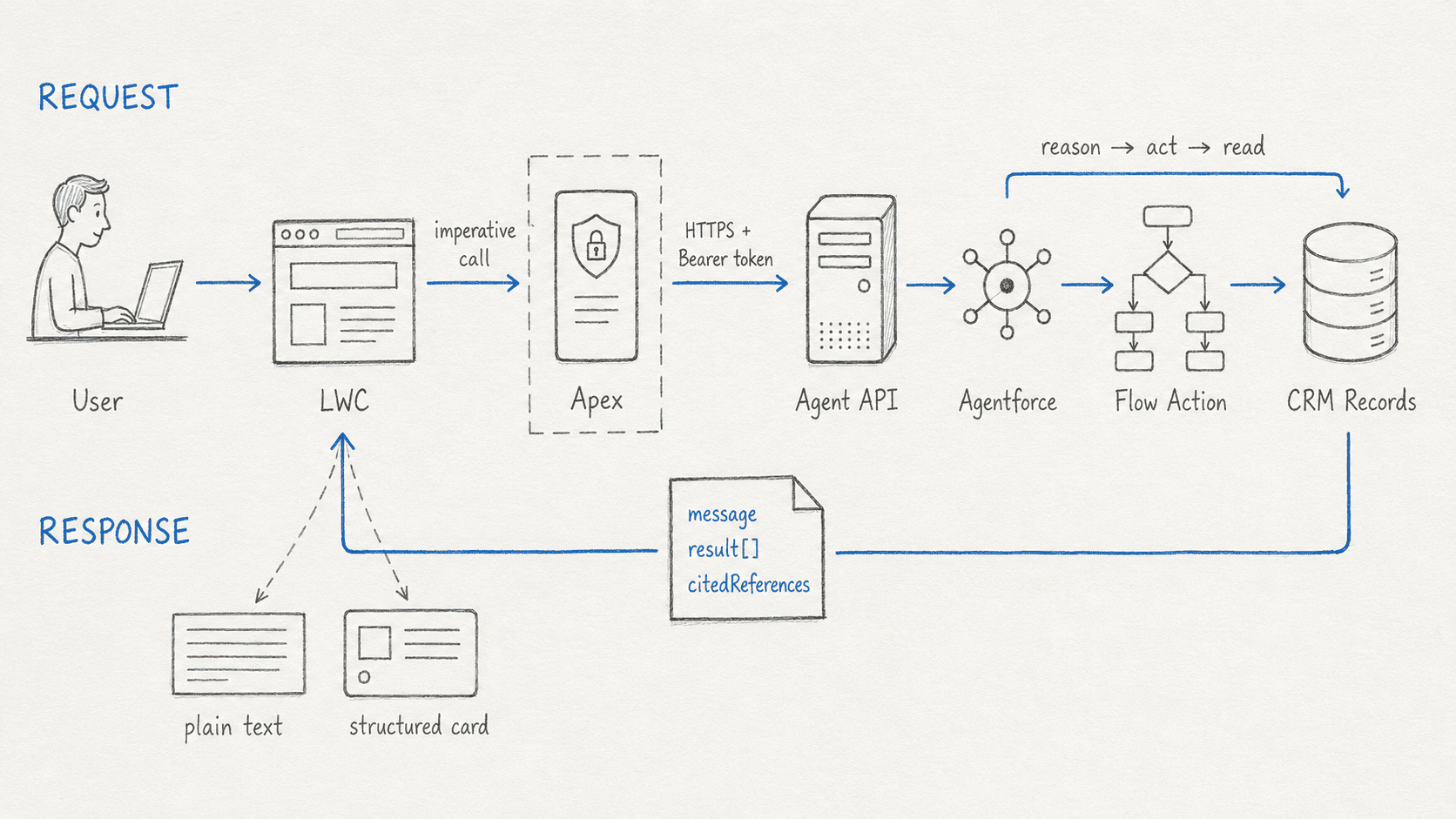
The Flow and CRM boxes show one possible action path. They are optional; structured output works even when the agent doesn’t call an action.
Before trying the calls, I needed an activated Agent API-compatible agent, its Agent ID, the org’s My Domain URL, and an OAuth access token created through an External Client App. Custom-connection metadata also requires Metadata API version 66.0 or later.
The app lets me paste a token because it makes the protocol easy to inspect. I wouldn’t use that authentication design in a production client; I’ll come back to that near the end.
The Agent API Is a Session API
My first useful mental shift was to stop thinking of Agentforce as a prompt endpoint. A conversation has a lifecycle:
start session → send message → send another message → end sessionThe session is what holds context. The LWC’s visible transcript is only a local copy for the user.
Starting the session
The start request is:
POST https://api.salesforce.com/einstein/ai-agent/v1/agents/{AGENT_ID}/sessions
Authorization: Bearer {ACCESS_TOKEN}
Content-Type: application/json
Accept: application/json
Because this client supports structured responses, it starts a Custom session:
{
  "externalSessionKey": "a-random-uuid",
  "instanceConfig": {
    "endpoint": "https://your-domain.my.salesforce.com"
  },
  "surfaceConfig": {
    "surfaceType": "Custom"
  },
  "streamingCapabilities": {
    "chunkTypes": ["Text"]
  },
  "bypassUser": true
}
A few details here are easy to miss:
instanceConfig.endpointis the My Domain URL, not the Lightning URL in the browser.externalSessionKeyis supplied by the client and is useful when tracing the conversation later.surfaceType: Customtells Agentforce to resolve the custom surface associated with this agent.- With
bypassUser: true, Salesforce uses the user assigned to the agent. Withfalse, it uses the user represented by the token.
In Apex, I build the body as a map and serialize it:
Map<String, Object> payload = new Map<String, Object>{
  'externalSessionKey' => sessionKey,
  'instanceConfig' => new Map<String, Object>{
    'endpoint' => normalizedDomain
  },
  'surfaceConfig' => new Map<String, Object>{
    'surfaceType' => 'Custom'
  },
  'streamingCapabilities' => new Map<String, Object>{
    'chunkTypes' => new List<String>{ 'Text' }
  },
  'bypassUser' => true
};
The response contains a sessionId. If that value is missing, there’s no conversation to continue, so the client treats it as a failed start.
Sending a turn
Messages go to the session endpoint:
POST https://api.salesforce.com/einstein/ai-agent/v1/sessions/{SESSION_ID}/messages
Authorization: Bearer {ACCESS_TOKEN}
Content-Type: application/json
Accept: application/json
The body contains the user’s text and a sequence number:
{
  "message": {
    "sequenceId": 1,
    "type": "Text",
    "text": "What options are available?"
  }
}
sessionId and sequenceId aren’t interchangeable. The session ID identifies the conversation. The sequence ID gives each user turn its order within that conversation.
In the LWC, I increment the sequence only after the call succeeds:
const currentSequenceId = this.sequenceId;

const rawResponse = await sendAgentMessage({
  accessToken: this.accessToken.trim(),
  sessionId: this.sessionId,
  userMessage: textToSend,
  sequenceId: currentSequenceId
});

this.addAgentMessages(JSON.parse(rawResponse));
this.sequenceId = currentSequenceId + 1;
That small detail matters. If the request fails, the same sequence number is still available for a deliberate retry.
Why the second turn remembers the first
Here’s a simple three-turn conversation:
1: What support options are available?
2: Which one is the fastest?
3: Summarize that option in one sentence.
The follow-up questions work because they use the same sessionId. I don’t need to rebuild the entire conversation and attach it to every request.
The browser still has state to manage, though. sessionId and the next sequenceId are protocol state. messages[] is display state. Clearing the transcript should not secretly end the Agentforce session, and ending the session should reset the protocol state even if I leave the transcript visible.
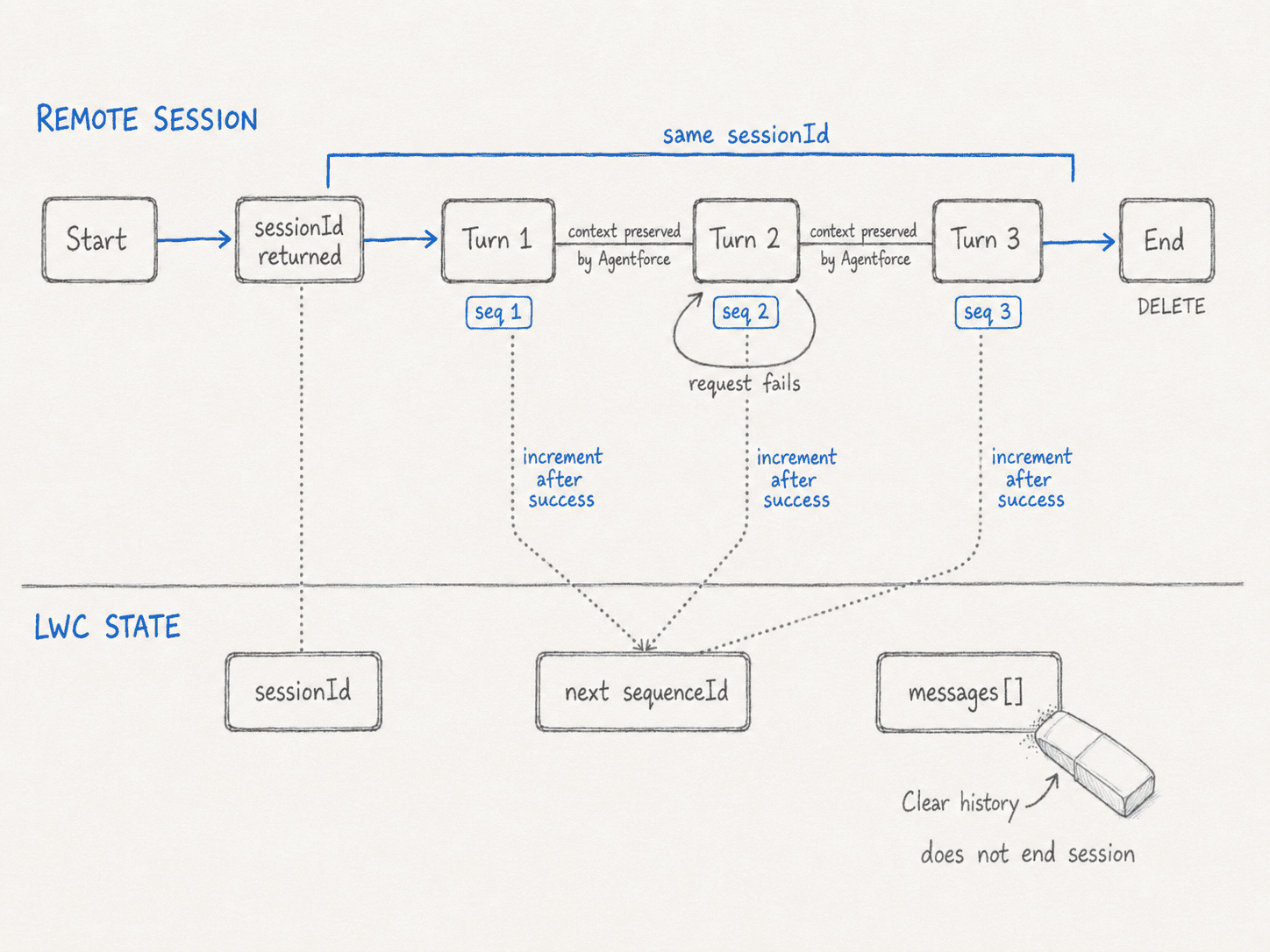
The remote session holds the conversational context. The LWC separately tracks what to display and which sequence ID to send next.
Ending the session
When the conversation is done:
DELETE https://api.salesforce.com/einstein/ai-agent/v1/sessions/{SESSION_ID}
Authorization: Bearer {ACCESS_TOKEN}
Accept: application/json
The API can return 204 No Content. My Apex controller turns an empty response into {"status":"ended"} so the UI doesn’t need a special branch for a blank body.
Structured Output Lives in the Custom Connection
This was the part I initially found easiest to misunderstand. I expected to pass a JSON Schema with the API message. That isn’t how Agentforce custom connections work.
The schema and connection are deployed as Salesforce metadata. The API call only asks for the Custom surface when the session starts.
Four names make up the full chain:
| Name | What it means |
|---|---|
AiResponseFormat | One JSON Schema that the client knows how to render |
AiSurface | The Custom connection and the response formats enabled for it |
plannerSurfaces | The link from an agent’s GenAiPlannerBundle to the AiSurface |
surfaceConfig | The runtime request that activates the Custom surface |
One naming detail caused me some unnecessary searching: AiSurface is its own metadata type, but plannerSurfaces is an element inside GenAiPlannerBundle. There isn’t a separate PlannerSurface metadata file in this implementation.
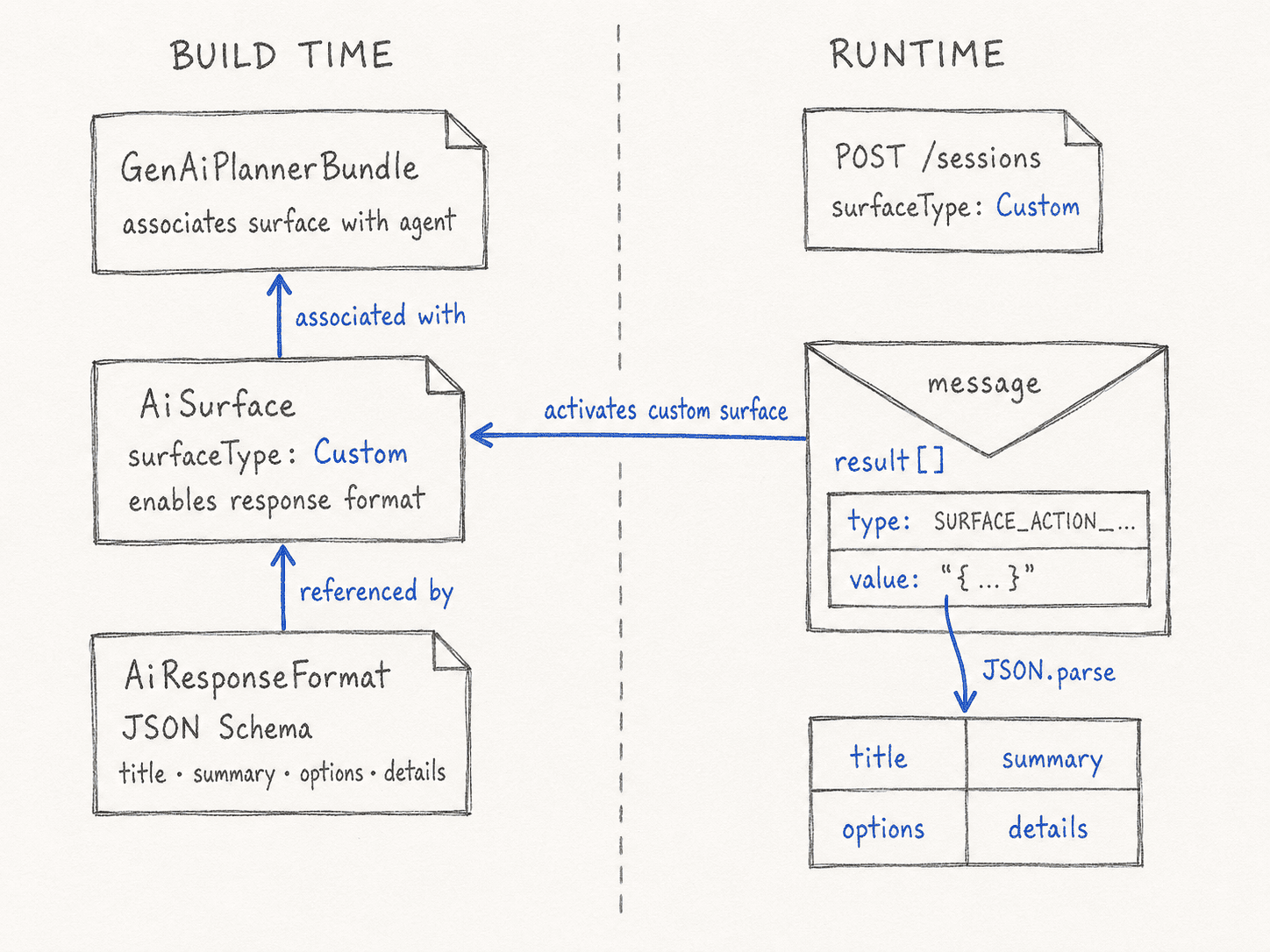
The response format defines the JSON, the surface describes what the client supports, and plannerSurfaces makes that surface available to the agent.
AiResponseFormat: the JSON contract
I used one general-purpose response shape:
{
  "$schema": "http://json-schema.org/draft-07/schema#",
  "type": "object",
  "additionalProperties": false,
  "properties": {
    "title": {
      "type": "string",
      "description": "A short heading for the response."
    },
    "summary": {
      "type": "string",
      "description": "The complete user-facing answer."
    },
    "options": {
      "type": "array",
      "items": {
        "type": "string"
      }
    },
    "details": {
      "type": "object",
      "additionalProperties": true
    }
  },
  "required": ["title", "summary", "options", "details"]
}
title and summary give the UI something predictable to show. options can become follow-up choices. details is the flexible part: it can carry counts, fields, records, or other facts when the response has them.
The metadata wraps that schema and adds instructions:
<AiResponseFormat xmlns="http://soap.sforce.com/2006/04/metadata">
    <description>
        Universal structured JSON envelope for user-facing responses.
    </description>
    <input>{ ... escaped JSON Schema ... }</input>
    <instructions>
        <instruction>
            Use this response format for greetings, answers, choices,
            clarifying questions, action results, and errors.
        </instruction>
        <sortOrder>1</sortOrder>
    </instructions>
    <masterLabel>Agentforce Structured Response</masterLabel>
</AiResponseFormat>
The instruction deliberately mentions both direct answers and action results. The format isn’t tied to the action that happened to run during testing.
A real client doesn’t have to use one universal envelope. It could define separate formats for a carousel, a confirmation, a date picker, or a form. The runtime response tells the client which one Agentforce selected.
AiSurface: what the client can handle
The surface connects those formats to a Custom channel:
<AiSurface xmlns="http://soap.sforce.com/2006/04/metadata">
    <description>
        Custom connection for a client that renders structured JSON.
    </description>
    <instructions>
        <instruction>
            Select an enabled structured response format for user-facing turns.
        </instruction>
        <sortOrder>1</sortOrder>
    </instructions>
    <masterLabel>Agentforce Custom Chat Client</masterLabel>
    <responseFormats>
        <enabled>true</enabled>
        <responseFormat>AgentforceCustomResponse_01</responseFormat>
    </responseFormats>
    <surfaceType>Custom</surfaceType>
</AiSurface>
The way I think about it is: AiSurface is the client telling Agentforce, “These are the response formats I understand.”
Its instructions apply to the connection as a whole. Instructions on an individual AiResponseFormat help Agentforce decide when that particular format fits. These are natural-language instructions, so they guide selection rather than guarantee it.
plannerSurfaces: the easy-to-miss link
Deploying an AiSurface does not automatically attach it to every agent. The agent’s GenAiPlannerBundle needs this entry:
<plannerSurfaces>
    <callRecordingAllowed>false</callRecordingAllowed>
    <surface>AgentforceCustomClient_01</surface>
    <surfaceType>Custom</surfaceType>
</plannerSurfaces>
This is the link that says, “This agent can use this custom surface.”
If I deploy the response format and surface but forget plannerSurfaces, the session request has nothing to resolve for that agent. When deploying the metadata incrementally, the dependency order is:
AiResponseFormatAiSurface- the updated
GenAiPlannerBundle
The surface references the format, and the planner bundle references the surface.
So where does an action fit?
An action can query data, update a record, run a Flow, or call another service. Its output becomes information the agent can use when composing its answer.
Response formatting happens after that. Salesforce describes the order as:
- subagent and action instructions run;
- Agentforce evaluates the enabled response formats;
- it selects at most one for the turn; and
- it falls back to normal text when no format is selected or formatting fails.
That same formatting step also applies when no action ran at all. This is why I’d describe structured output as a client or channel contract, not as an action response.
The Response Contains JSON Inside JSON
When Agentforce selects the response format, the message can look like this:
{
  "messages": [
    {
      "message": "Text response reformatted for the custom client.",
      "result": [
        {
          "property": "",
          "type": "SURFACE_ACTION__AgentforceCustomResponse",
          "value": "{\"title\":\"Available options\",\"summary\":\"I found three options.\",\"options\":[\"Compare them\",\"Show details\"],\"details\":{\"count\":3}}"
        }
      ]
    }
  ]
}
The double parse is not a typo. First I parse the Agent API response. Then I parse the string stored in result[].value:
const response = JSON.parse(rawResponse);
const result = response.messages[0].result[0];
const structuredValue = JSON.parse(result.value);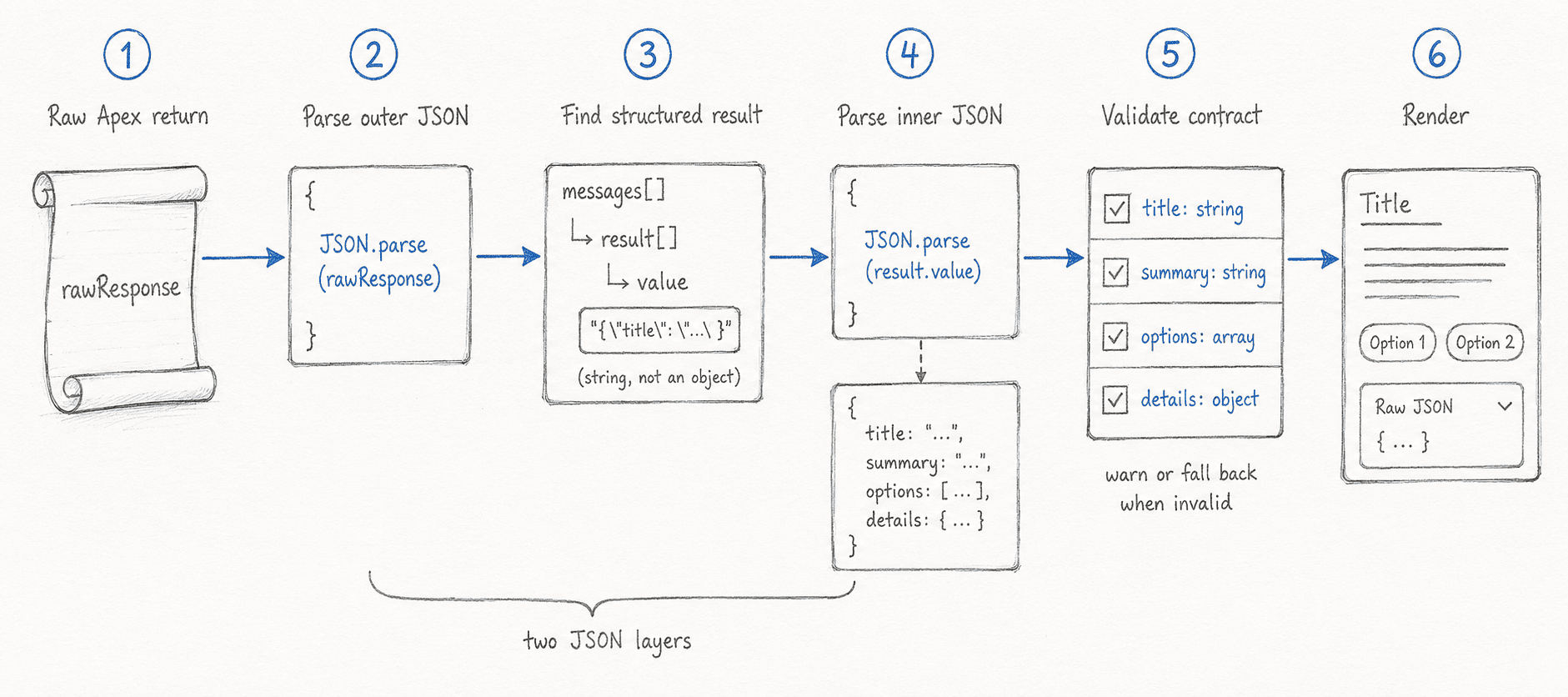
result[].value is an encoded JSON document inside the larger Agent API response.
The runtime type starts with SURFACE_ACTION__. The remainder identifies the applied response format and can be used as a renderer key.
I also avoid assuming that the useful item is always the first result:
findStructuredResult(results) {
  if (!Array.isArray(results)) {
    return null;
  }
  return (
    results.find(
      (item) =>
        item &&
        typeof item.type === "string" &&
        item.type.startsWith("SURFACE_ACTION__") &&
        item.value !== undefined &&
        item.value !== null
    ) ||
    results.find(
      (item) => item?.value !== undefined && item?.value !== null
    ) ||
    null
  );
}
A Schema Is Guidance, Not a Safety Net
One of the more important details in Salesforce’s documentation is that the platform doesn’t strictly validate the generated value against the schema. The client still needs to check the result before rendering it.
For my envelope, that means checking:
title   → non-empty string
summary → string
options → array
details → object
It also means keeping several fallback paths:
No result[]
  → show message as plain text
result[].value is not valid JSON
  → show a warning and preserve the raw value
JSON does not match the schema
  → render only safe fields, or reject it
Valid result
  → send it to the matching renderer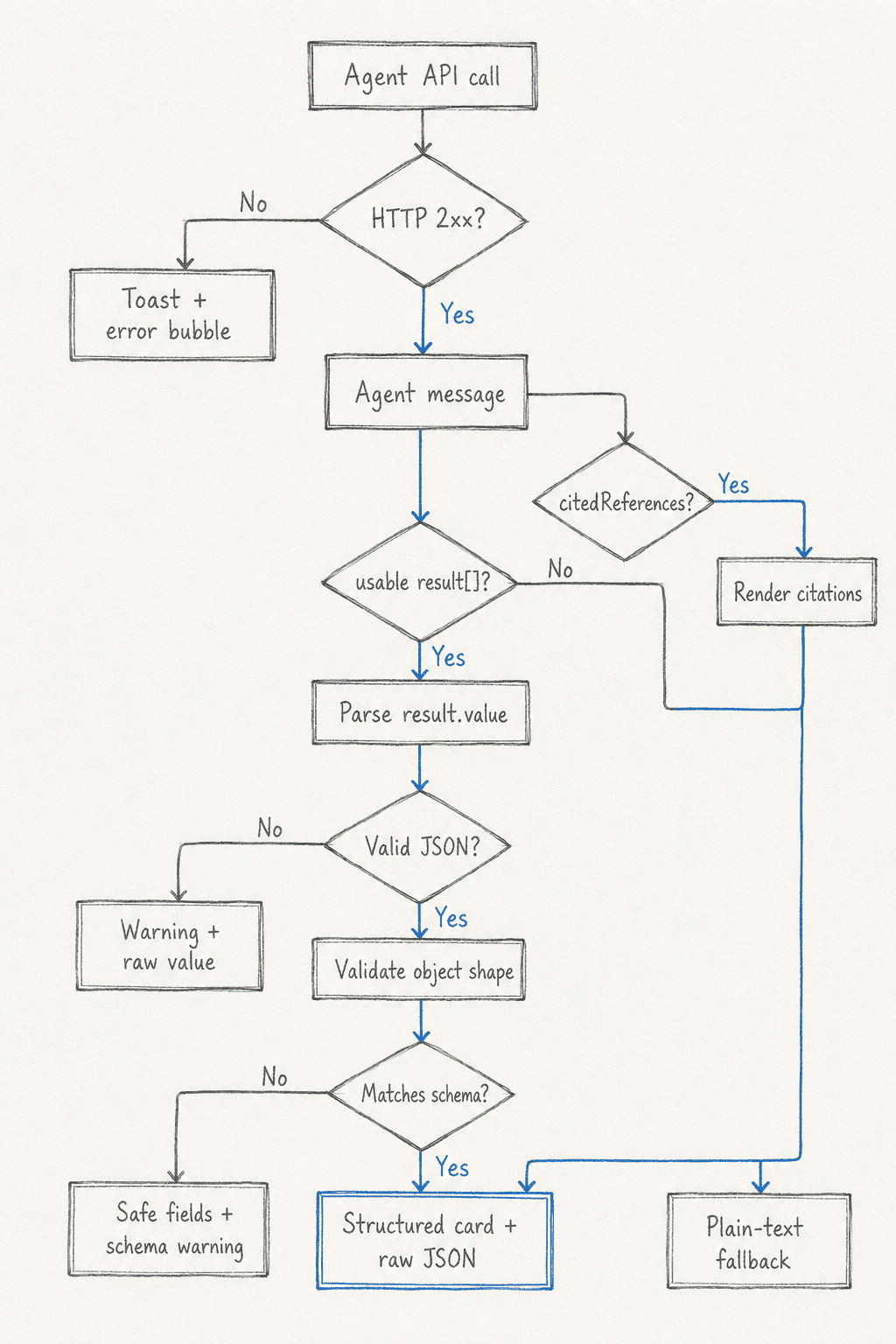
Plain text is a normal fallback for a custom connection. The renderer should expect it.
During development I kept the pretty-printed JSON below the formatted card. That made schema mistakes obvious and saved a lot of time. In a production UI I might hide it, but I’d keep the same validation underneath.
If a message also contains citedReferences, I render those separately. Citations are Agent API message metadata; they don’t need to be copied into every custom response schema.
How I Split the Work Between Apex and the LWC
The Apex controller exposes three methods:
startAgentSession(...)
sendAgentMessage(...)
endAgentSession(...)
Apex validates the token, IDs, domain, message, and sequence number; builds the requests; sets headers and timeouts; and turns non-2xx responses into handled errors.
The LWC owns the session state and rendering. It prevents sends before a session exists, increments the sequence after success, parses result[].value, validates the object, and chooses between a structured card and text fallback.
That split worked well because neither layer needs to know too much about the other. Apex doesn’t build UI models, and the component doesn’t know how to make a remote callout.
The tests follow the same boundary. HttpCalloutMock covers session start, message send, delete, validation errors, and API failures. Jest is the right place for invalid inner JSON, missing result[], schema mismatches, citations, and sequence-state behavior.
What I Would Change Before Production
The manual token field is a learning tool, not a deployment pattern. For a production client, I would use an External Client App with an intentional OAuth flow and move the Apex callout behind Named Credentials and External Credentials where the authentication flow supports them.
I would also:
- grant credential-principal access through permission sets;
- avoid logging tokens or full sensitive responses;
- validate business rules separately from JSON shape;
- keep the external session key and session ID for tracing; and
- reject malformed structured data before any consequential operation.
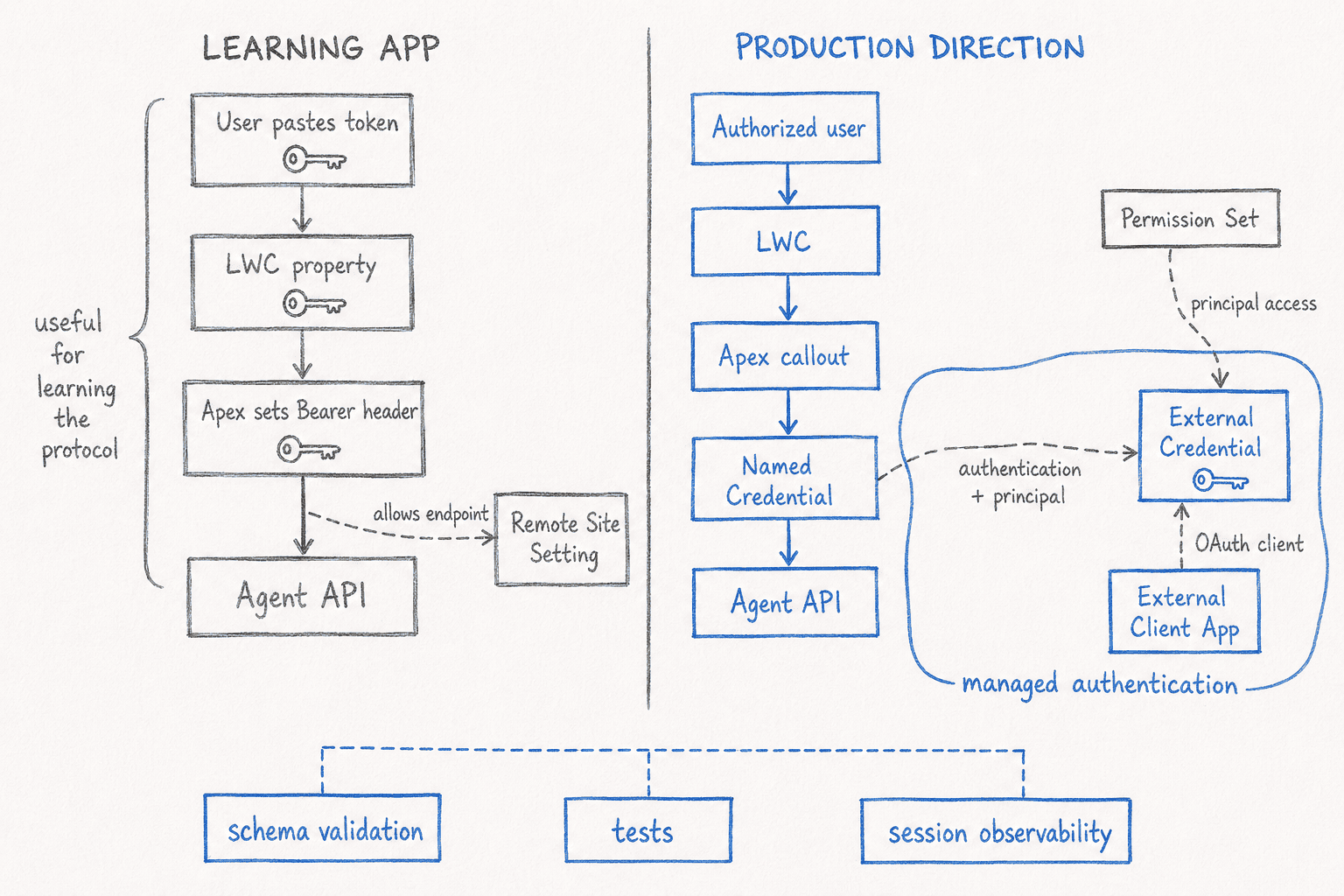
The Agent API calls stay familiar in production; credential handling moves out of the component and behind managed security boundaries.
The app currently uses the synchronous message endpoint. That was the right place to start because I wanted complete responses and structured cards. Streaming would improve perceived latency, but it also adds Server-Sent Events, chunk ordering, progress events, and end-of-turn handling.
The Mistakes I’d Avoid Next Time
The first is confusing action output with client response formatting. They are separate schemas at separate stages.
The second is deploying AiResponseFormat and AiSurface but forgetting the plannerSurfaces entry on the agent. A Custom session can only resolve the surface associated with that agent.
The third is assuming the JSON Schema guarantees valid output. It doesn’t. The client remains the validation boundary.
The fourth is treating every response as structured. message is not a legacy field to ignore; it is the fallback path the client still needs.
And finally, I wouldn’t confuse the visible transcript with Agentforce memory. Context lives in the remote session. Clearing a list in JavaScript changes the screen, not the conversation.
The Mental Model I Kept
By the end of the project, I had reduced the integration to four sentences:
The Agent API carries the conversation.
The agent decides what to say and whether it needs an action.
The custom connection describes how the client can receive the answer.
The client validates and renders whatever comes back.
That separation made the whole implementation easier to reason about. It also made the result reusable: the agent behind the API can change, and the client contract can stay the same.